

Hello, this is Matsun from Liberogic.
In our previous article, "How We Use Supabase RLS in Business Applications," we introduced how access to data is controlled.
This time, we explain why we combine Cloudflare and Supabase.
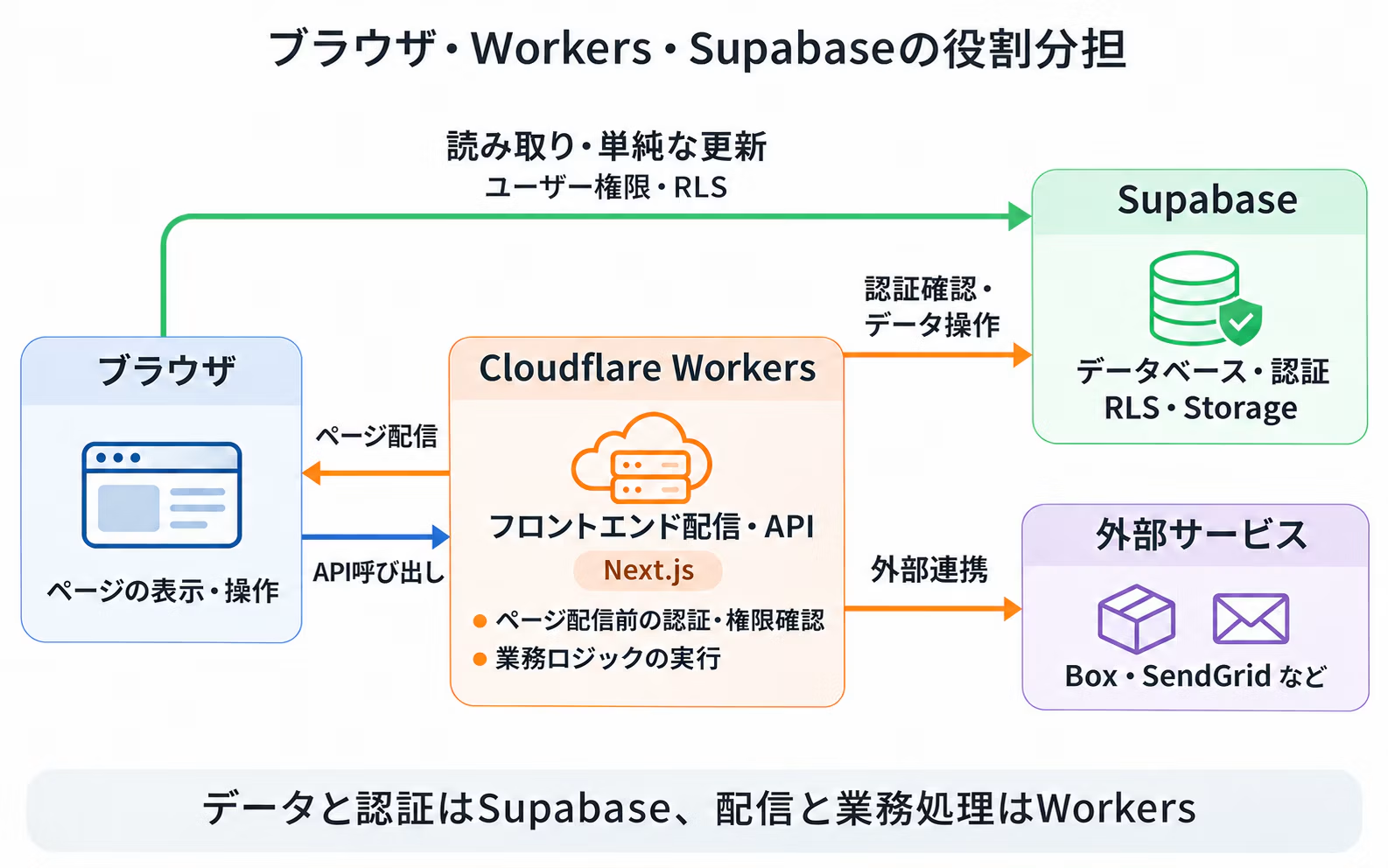
To state our conclusion first, we divide the work so that Supabase handles data and authentication, while Cloudflare Workers handles frontend delivery and processing that involves business logic.
In this article, "frontend" refers collectively to the pages displayed in the browser and the processing that generates them, such as Next.js.
What Supabase Handles
Supabase is a service that provides the functions a web application backend requires, all in one place.
It includes a PostgreSQL database, authentication with multi-factor authentication support, access control through RLS, Storage for saving files, and Realtime for receiving data changes as they happen. In short, it has the features business applications need.
What is especially convenient is that these features work together and are offered as a managed service.
Because authenticated user information can be referenced directly in RLS policies, you can control the data each user can read and write even when the browser accesses the database directly.
APIs corresponding to database tables are also generated automatically, so there is no need to implement APIs one by one for simple reads and writes.
Database server operations and backups are also handled by Supabase, so you can focus on application development.
If a service only provided a database, you would have to implement authentication, access control, and APIs yourselves.
The reason we chose Supabase is that authentication, access control, and APIs can all be used as one integrated package.
On the other hand, Supabase does not offer frontend hosting.
Even when using Supabase, you still need to decide separately where to deliver your frontend.
At Liberogic, we use Cloudflare Workers to deliver our frontends.
Applications built with Next.js can also run on Workers, so frontend delivery and server-side processing can be consolidated in the same execution environment.
Dividing Responsibilities in a Web Application Using Next.js and Supabase
This section explains the approach using a web application where the frontend is built with Next.js and Supabase is used as the backend.
With Next.js, data can be fetched on the server before the page is returned, or fetched in the browser after the page is displayed.
In our business applications, we divide these two approaches as follows.
Tasks handled on the server (Next.js on Workers)
- Checking login status and refreshing sessions. If the user is not logged in, redirecting them to the login page without returning the page.
- Verifying that multi-factor authentication has been completed.
- Retrieving the logged-in user's profile and checking whether that user is allowed to use the feature.
- Verifying that values included in the URL, such as the target month, are valid.
Tasks handled in the browser
- Fetching data for display on the page, such as lists and details.
- Data updates
By completing authentication and permission checks before returning a page, you can prevent awkward behavior, such as briefly showing a page with features the user cannot use and then redirecting.
On the other hand, if the data on the page is also fetched on the server side, the entire page will not be displayed until that fetching is complete.
Business applications often involve a series of actions performed without switching pages.
For example, when a button is clicked, only the necessary data is fetched, a loading indicator is shown only for that section while data is being retrieved, and only the updated parts are re-rendered.
To improve the experience of these fine-grained interactions, we fetch and update data within the page from the browser at the necessary timing.
Accordingly, we divide the responsibilities as follows.
Browser
- Page display and interaction
- Data fetching and update requests
- Read operations and simple updates access Supabase directly (executed with the logged-in user's permissions and controlled by RLS)
- Write operations involving business logic and integrations with external services call the Workers API
Cloudflare Workers
- Frontend delivery (Next.js) and authentication and permission checks before returning pages
- API
- Write operations involving business logic
- Integration with external services (such as sending emails, file integration, and receiving Webhooks)
Supabase
- Database
- Authentication
- Access control with RLS
- Storage
Processing that cannot run in the browser goes to Workers
Business applications often integrate with many external services, such as SendGrid, Box, core business systems, and various SaaS products.
These integrations require credentials such as API keys, but anything included in code that runs in the browser is visible to users, so these credentials cannot be placed in the browser.
For that reason, we consolidate communication with external services in Workers.
Credentials are managed only on the server side as Workers environment variables, and the browser calls the Workers API.
If the connected service changes, the update can often be limited to the Workers side, which keeps the impact on the frontend small.
Limit write operations involving business logic to Workers
As we covered previously, RLS is a mechanism that controls which users can read or write which rows.
For simple reads, or writes such as updating one's own profile, it is sufficient to access Supabase directly from the browser and control access with RLS.
On the other hand, write operations that involve business logic have more complex conditions. For example,
- Applicants can edit the body text only while the document is in draft.
- Approvers can change only the status.
- Amounts are not taken from the submitted input as-is; they are recalculated on the server side.
These are the kinds of conditions involved.
Trying to express all of them in RLS policies makes the policies complex. If even one case is overlooked, an invalid update will be allowed through.
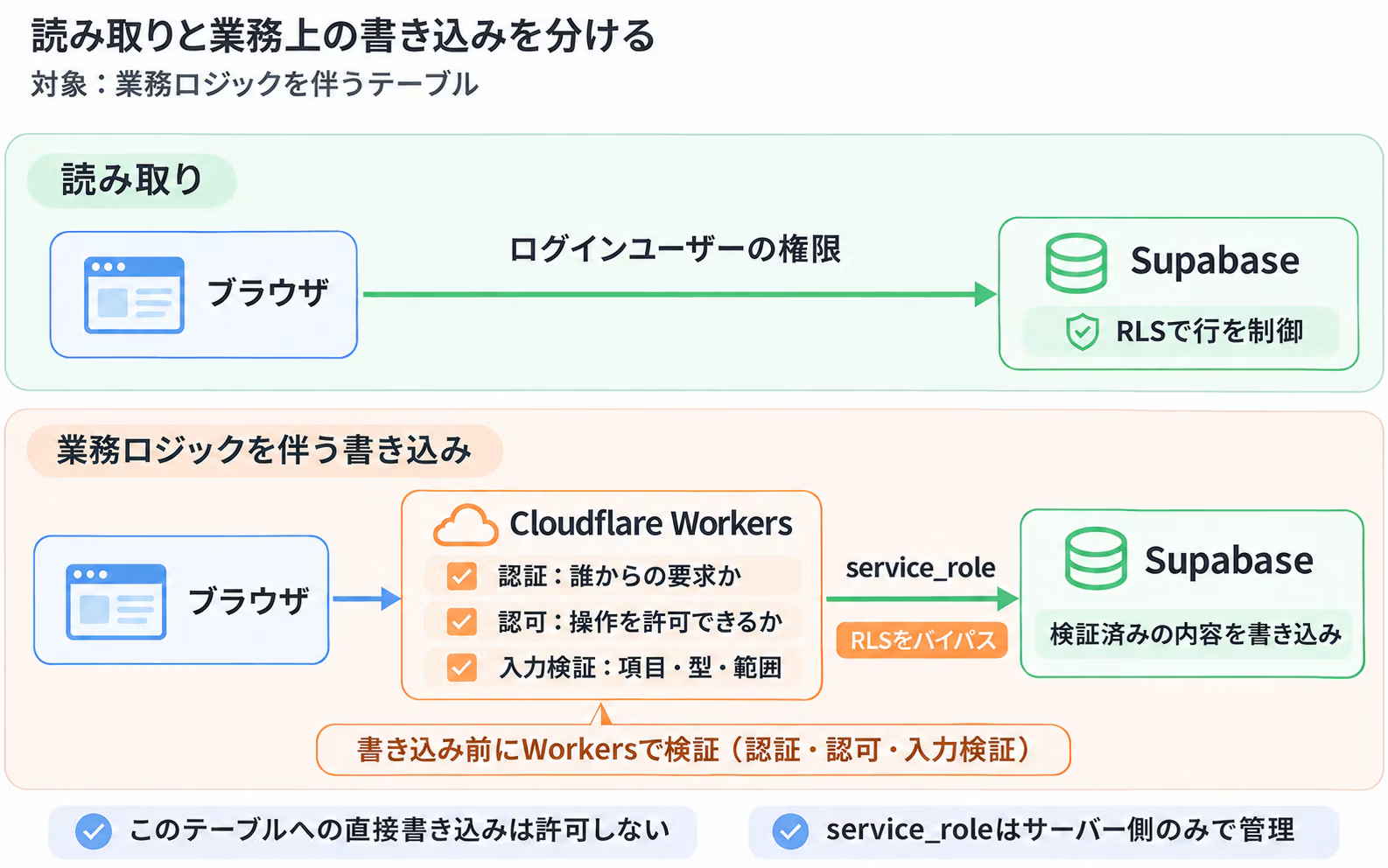
For that reason, we handle tables with business logic as follows.
- Logged-in users are granted read-only permissions, and RLS controls which rows they can read.
- Write permissions are granted only to Workers, which write to Supabase using the service_role.
- In Workers, the fields each user is allowed to change, along with their value types and ranges, are strictly defined in a schema, and any input outside that definition is rejected.
The service_role is a privilege that is not subject to RLS controls.
For that reason, Workers always verify the authentication of the requesting user and confirm that the operation is permitted before any write.
The idea is to limit write access to the database to a single path and strictly validate input along that path.
This does not mean RLS is no longer used; read access control continues to be handled by RLS as before.
Not everything goes through Workers
On the other hand, not all traffic needs to go through Workers. Routing reads and simple updates that
RLS can handle sufficiently through Workers only adds API implementation and operational overhead.
We use each approach depending on the nature of the processing, as follows.
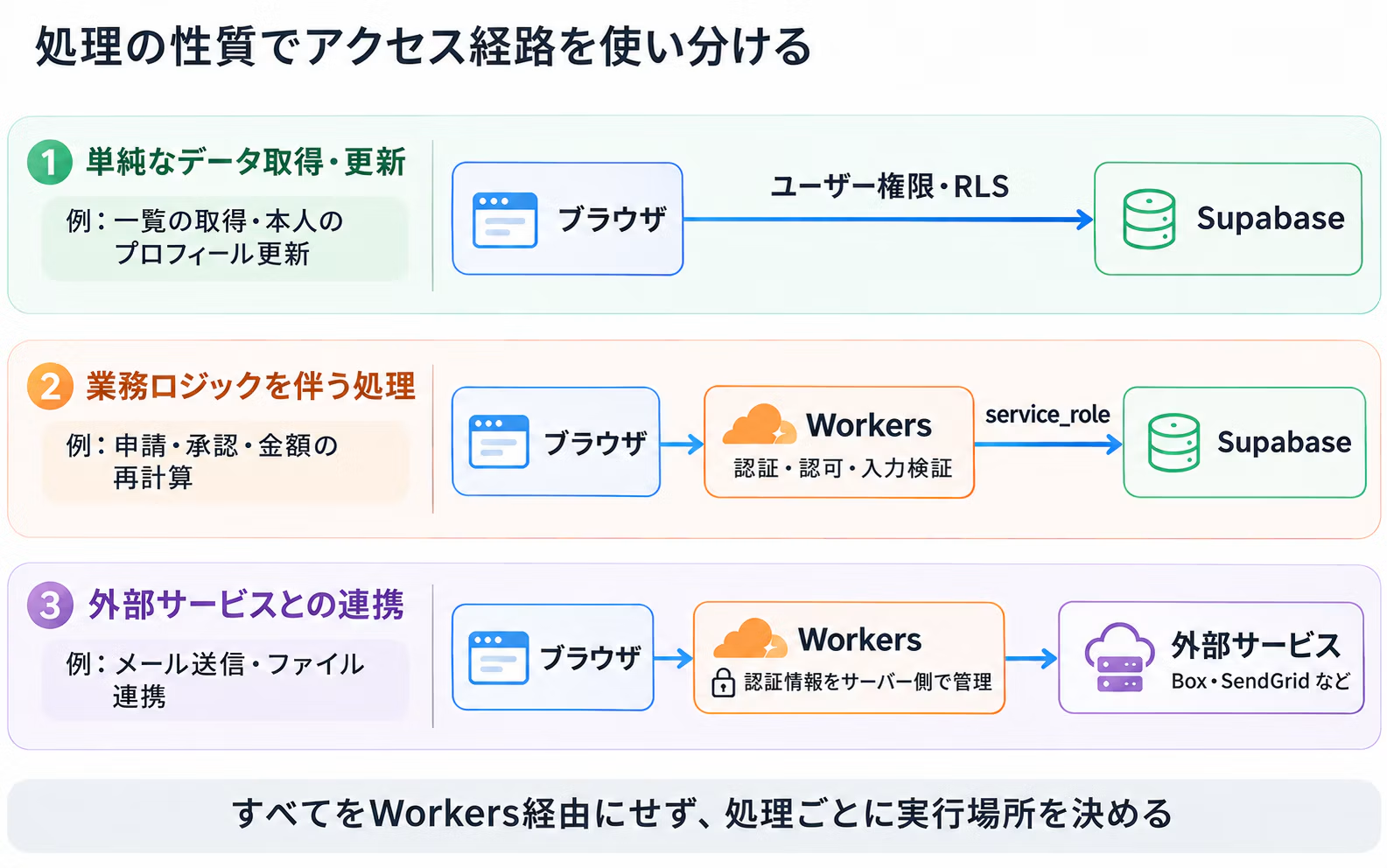
Routing everything through Workers is not the goal in itself. We choose the approach based on the nature of each task.
Easy to combine with other Cloudflare features
Using Workers also makes it easier to connect with other Cloudflare features, such as the following.
- WAF
- Rate Limiting
- Turnstile
- Access
- R2
- Queues
Consolidating the entry point of your web application on Cloudflare also makes it easier to organize security and surrounding processing.
Using each tool for what it does best
Supabase and Cloudflare are not meant to build everything on just one of them.
- Supabase handles authentication and data management
- Cloudflare Workers is where application-specific processing takes place.
This split is commonly used, and with this setup you can start small and add necessary processing step by step.
Summary
Combining Cloudflare Workers with Supabase is to separate the handling of data from application-specific processing.
Reading and writing data controlled by RLS is left to Supabase, while handling integrations with external services and sensitive secrets is placed on the Workers side.
We believe that rather than concentrating everything in one place, dividing roles by process leads to an architecture that is easier to operate.





Usually fairly laid-back, but when something catches my interest, I dig in until I fully understand it. Through plenty of trial and error, I quietly keep working on development day after day.
Matsun
Frontend Engineer