

Hello, I'm Otsuka, CTO at Liberogic.
Cyberattacks targeting corporate websites and systems have been occurring one after another, and a serious PHP vulnerability has also drawn attention since the day before yesterday.
The web application development we'll discuss this time is set up to minimize the burden of such security measures and operations as much as possible. However, I'd like to cover security topics in a separate opportunity.
For custom web applications tailored to a company's operations, such as approval workflows, member-only mypages, client portals, and time management, we often use a combination of Supabase and Cloudflare.
In the past, we had to build individual components on AWS, such as EC2, RDS, S3, and Cognito, or set up Linux servers and install web servers, middleware, and frameworks ourselves. Each of the database, authentication, API, and file storage layers required significant effort to build and operate.
With Supabase and Cloudflare, the foundational layers are handled by the services, so you can focus on building the features the application actually needs.
This article gives a brief overview of the kinds of custom web apps you can build by combining Supabase and Cloudflare.
What Is a Custom Web App?
A "custom web app" here refers to a web application built to fit a specific company and its operations.
For example:
- Internal approval and request system
- Member-only mypage
- Partner Portal
- Time Tracking & Attendance Management
- Project Management
- Inquiry Management
- Management Systems for Stores and Branch Offices
- File Sharing & Review System
- Management of Surveys and Assessment Results
- Admin Dashboards for Various Business Operations
When we receive a request like this, we first check whether it can be met with an existing SaaS or packaged product. For standard business operations, that is often faster and more affordable to implement.
However, when we list out the actual requirements, we often find that no off-the-shelf product matches exactly what's needed.
Companies often have their own approval workflows, display different information depending on the department or branch, or need to integrate with existing systems.
In such cases, rather than adapting the business to a SaaS product and continuing to cover the gaps through operations, building a dedicated web app tailored to the business often turns out to be the better proposal, allowing the client's work to run more smoothly. In practice, we find that many cases lead us to this conclusion.
Supabase brings together the data foundation for web apps
Supabase is a service that provides the backend functionality needed for web apps in one integrated package.
It has gained considerable momentum worldwide, with more than 10 million developers using it. Y Combinator, the well-known U.S. startup accelerator, announced that 55% of its most recent batch adopted Supabase, and it is increasingly becoming a go-to choice for the backend of new services.
Most of these results come from services with large numbers of consumer (B2C) users, but we use this approach on the premise that it applies just as well to business web apps used internally or with partners, essentially as "intranet-style" tools.
Key features include:
- Database (managed PostgreSQL database)
- Auth (user authentication and login)
- Auto-generated API (define a table and a REST API is ready to use)
- RLS (Row Level Security: row-level access control)
- Storage (file storage)
- Realtime (real-time communication)
- Edge Functions (serverless API processing)
and more.
For business applications, you can manage user information, project records, application data, and operation history in a Supabase database.
Supabase Auth also lets you add login functionality right away. Auth works well with business applications because it supports sign-in with Microsoft and Google accounts.
If your company already uses Microsoft 365 or Google Workspace, employees can log in with the accounts they already use. There's no need to issue and distribute new IDs and passwords for the app, and account management for joiners and leavers can follow your existing systems.
In the past, it was common to set up a database and authentication separately and connect them. With Supabase, data and authentication can be consolidated on a single platform.
With Row Level Security (RLS),
- users can only see their own data
- Show only data from the same office
- Administrators can see everything
Controls like these can also be enforced on the database side.
For business applications, this kind of permission control is critically important.
Using Cloudflare to deliver the frontend
That said, Supabase alone can't do everything. It doesn't handle "web site (frontend) hosting."
While the database and APIs can live on Supabase, the screens users access in their browsers still need to be served from a separate location.
The leading options for this are Vercel and Cloudflare. We chose Cloudflare, for several reasons.
- DNS, CDN, WAF, and app delivery can all be managed centrally on Cloudflare
- Cloudflare Workers can handle not only frontend delivery but also API processing and external service integrations
- It offers complementary services well suited to business applications, such as R2 (storage) and Access (access control)
- The pay-as-you-go data transfer model is simple, making budgets easy to predict
Cloudflare is often thought of as a CDN or DNS provider, but today it is also a service that works well as a platform for running web applications.
Looking at Cloudflare from an agency's perspective
In short, in this architecture, Cloudflare handles everything from receiving user requests to returning the screens and APIs, while Supabase takes care of the data, authentication, and access control behind them.
Combining Supabase and Cloudflare
For example, a setup like this.
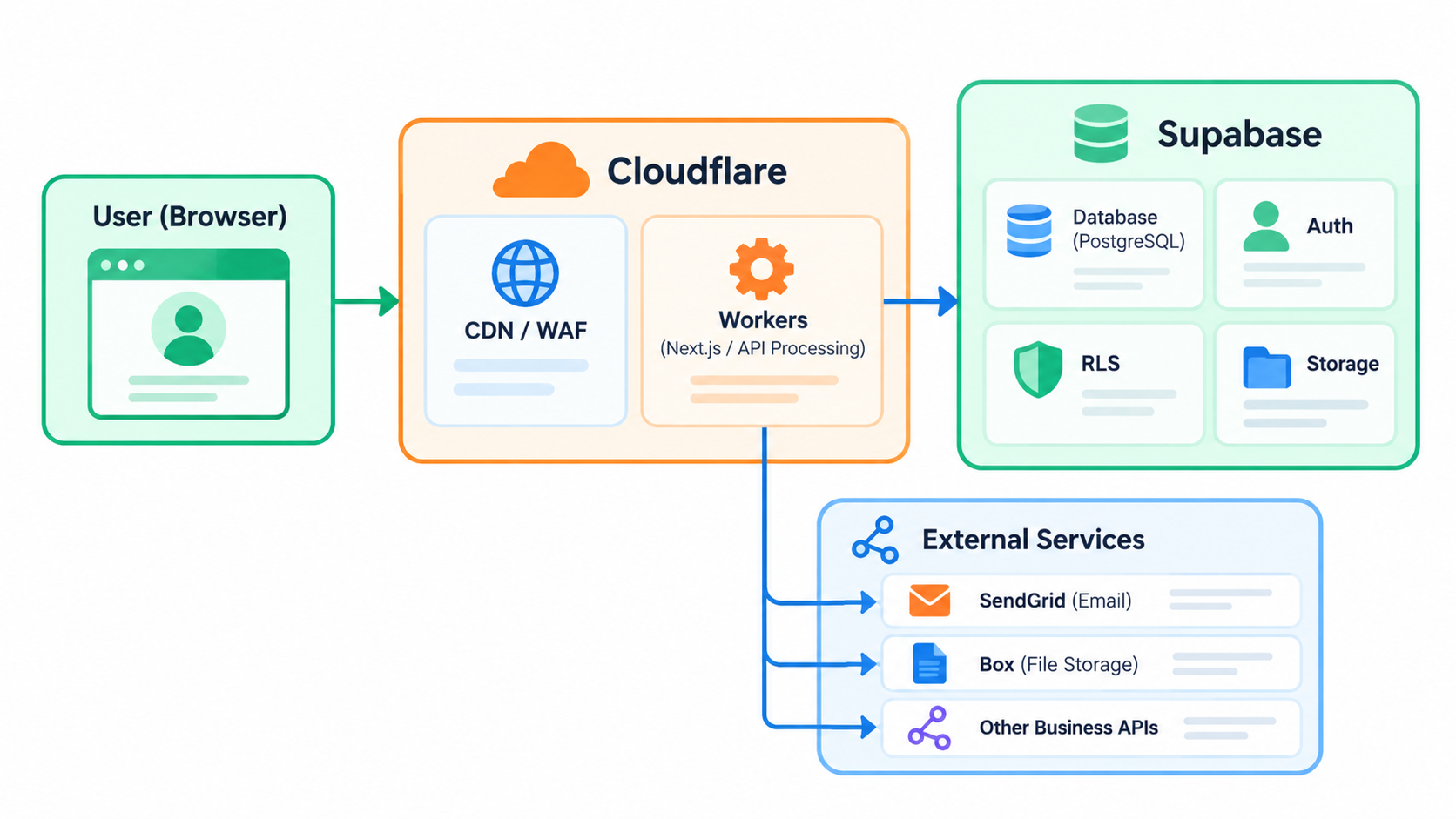
An app running on Cloudflare Workers receives user requests and returns screens and APIs, while Supabase handles data and authentication behind it.
As needed, you can send emails through SendGrid, store files in external storage such as Box, or integrate with other business systems via API.
The strength of this architecture is that it is built from standard technologies and is not tied to any particular integration partner.
Anything that supports API integration can be connected freely, whether it is an existing core business system or a SaaS tool you already use. There are none of the restrictions common in off-the-shelf business packages, such as "this product can only integrate with XX."
Examples of business apps you can build
Internal Request & Approval App
An app where requests are submitted from each site or staff member and approved by supervisors or administrators.
Depending on the logged-in user, the following controls are also available:
- Show only their own requests
- Show requests within their site
- Administrators can view all requests
.
Think of it as turning work previously handled via email and Excel into a web app as-is.
Partner Portal
Issue a login ID for each partner so they can
- View documents
- Upload files
- Progress Check
- Contact
- Contract Information Review
You can also build portals for tasks like these.
It's relatively easy to control what information each client sees.
Time Tracking & Attendance Management
An app where employees enter working hours and effort, with totals by project and by person.
Custom rules or internal aggregation methods that general attendance SaaS tools struggle to handle are a good fit for a dedicated web app.
Forcing this kind of work to fit an off-the-shelf product often creates more hassle than it solves.
Location Management System
Also well suited to web apps where stores or branch offices across the country submit information that headquarters manages centrally.
We can build everything from internal tools used by a few people to business apps used across multiple locations.
Supabase is not only for small-scale projects.
With the right design, it can be used for a wide range of purposes.
For example, here are some apps we have helped build.
When to choose a custom web app over SaaS
We've covered the benefits of custom web apps so far, but they aren't always the right answer.
Here, we'll look at how to tell when it's worth building one. These are the guidelines we've found useful in real client consultations.
- Operations are routinely patched by hand
Approval routes differ by department, exceptions are frequent, and the workflow has drifted from what SaaS assumes. Settings alone can't absorb the gap. - Permission and display controls are fine-grained
You need to show different information by department, location, or business partner, but SaaS permission features lack the necessary granularity. - Work spans multiple tools
Staff move between Excel, email, and several SaaS products, and manual copying and pasting has become routine. - Custom fields and aggregation rules are numerous
Company-specific data is forced into the generic fields of a SaaS product. - The product has too many features, or too few
A general-purpose SaaS can feel overly complex so the field doesn't use it, or it's missing the one function the team actually needs.
If only one or two of these apply, adjusting SaaS settings or operations can often solve the problem.
However, if several apply and the daily "small hassles" keep piling up, it's likely time to consider a custom web app built around your workflow.
In practice, conversations about custom web apps often start with requests like "We want to move the information we manage in Excel onto the web," "We want to digitize the approval requests we handle by email," or "We want to consolidate a workflow spread across several SaaS products."
Start small, and grow it as you use it
So far we've been talking about the technical architecture, but what I want to share in closing is less about the features of Supabase or Cloudflare themselves and more about how the project is run.
"What should we build?" is surprisingly hard to answer from a requirements document alone.
Typical software development starts with requirements definition. The existing business operations are first documented, and then a system is designed to meet them.
However, this approach has a weakness. Even when the documents cover business operations thoroughly, requirements tend to pile up without anyone asking whether the screens will actually be easy to use or whether the features are truly necessary.
This is especially difficult for people who have been appointed to lead DX initiatives but are not specialists in system development. Judging whether requirements make sense based only on text and tables is genuinely hard.
At Liberogic, rather than solidifying a thick requirements document up front, we create mockups (working prototypes of the screens that users can actually operate) using tools such as Figma, v0, and Claude Code, and move the discussion forward while stakeholders interact with them.
Unlike text-only requirements, actually operating a screen lets people experience with striking realism how it would feel to use it. Interestingly, the focus then shifts from "reviewing documents" to "improving operations." People start saying things like, "If this screen existed, that part of our work would become much easier," or "Could we also automate that other task we're doing separately?"
For dedicated web apps, the part that matters more than you might expect is this question of "what should we build." We believe that becomes clear not within documentation, but through sharing an image of the product via mockups.
Implement only the core functionality and launch first
We don't follow the so-called waterfall approach of deciding all requirements upfront and building everything in one go. Once the direction is set through mockups, we implement only the essentials first, such as login, data registration, list views, and an admin panel, and then launch.
From there, we check how people actually use it and how the field responds, then add features such as approval workflows, email notifications, file management, and external API integrations.
The Supabase and Cloudflare architecture works very well with this incremental approach.
Grow it in line with your budget and business value
Building small and expanding as needed also has a budget benefit. For example:
- Develop features gradually, in line with the annual budget you have set aside.
- Launch a minimal version first, then invest further to expand the app once its business value becomes clear.
This approach works well. You don't need to fund a large development budget up front to have and grow a business app. We believe business apps tend to succeed when they are improved through real use, rather than trying to define every requirement perfectly from the start.
Summary
By combining Supabase and Cloudflare, you can build a dedicated web app with authentication, database, permission control, API, and file delivery in a relatively lean setup. It can scale from small internal tools to partner portals and business systems used across multiple sites, depending on your needs.
That said, what matters most is not the tools themselves, such as Supabase or Cloudflare, but how the project is run.
- Start with mockups to share a clear picture of how the app will actually be used, and identify what should be built
- Build only the core functionality and launch quickly
- Improve it through use, growing it in line with your budget and business value
This approach was not practical in the past. Both software implementation and infrastructure setup were expensive, so everything had to be fully decided before development could begin.
Today, modern technology stacks such as Supabase and Cloudflare, combined with AI agent-assisted development and prototyping, make it possible to move closer to an ideal approach: build something usable first, then refine it as it is used. This is exactly the approach Liberogic excels at.
Your inquiry can start at an early stage, such as "Could we turn this Excel and email-based workflow into a web app?" or "We tried a SaaS product, but it doesn't quite fit our operations." We will work with you to design a setup that fits your business, so please feel free to contact us.




The backbone of Liberogic's technical division. Whenever he hears someone say, "I wish we had something like this, it would be so handy," he adds his own ingenuity, turns the idea into added value, and gets it implemented in no time. A highly sociable team member who has many fans among our clients, he is a treasured asset to our company and a devoted cat lover.
Sho Otsuka
Director, CTO / Chief Engineer / Representative, Nekoana LLC / Looks unreasonably young