

We previously implemented Google Form customization in response to requests to migrate website contact forms to Google Forms.
We've compiled this content in our columns, and we're grateful that so many people find it helpful! Thank you.
Pitfalls when creating customer forms with Google Forms
Implementing a confirmation screen for Google Forms customization
Recently, we received a request asking whether there are any measures to handle large volumes of spam emails.
In this third installment of our Google Form column, we've compiled guidance on spam protection strategies for Google Form customization.
The first solution that came to mind was whether we could implement reCAPTCHA, a free security service provided by Google.
However,

Google Forms does not have a built-in setting or toggle to "enable reCAPTCHA." There is no such option in the form editor, and this is not an officially provided feature by Google.
Furthermore, upon further investigation, reCAPTCHA on Google Forms operates at Google's discretion, and whether the reCAPTCHA badge appears is unpredictable.
In the first place, Google Form customization requires entering field IDs like entry.386122698 into HTML, so they are all visible in plaintext. With just the URL and entry ID, it is technically possible to send a direct POST request to formResponse using simple scripts like curl or Python's requests library, without opening the page in a browser.
In fact, most Google Form spam appears to follow this pattern of "bypassing the page and hitting the endpoint directly," and adding reCAPTCHA does not help—it remains ineffective against direct POST requests unless token validation is performed server-side (e.g., via Google Apps Script), so it is not a fundamental solution.
But there are countermeasures!
In reality, many actual spam bots are the generic type that 'finds contact forms, automatically fills them in, and submits them' (bots that actually render the page and submit via the DOM).
Against this type, controlling the submit button with JavaScript has a certain level of effectiveness. To improve accuracy, we recommend combining multiple techniques. All of these methods require only changes to the HTML file—you don't need to touch Google Forms or Google Apps Script at all.
Reference: [reddit] How can I prevent bots from spamming my Google Form and flooding my email?
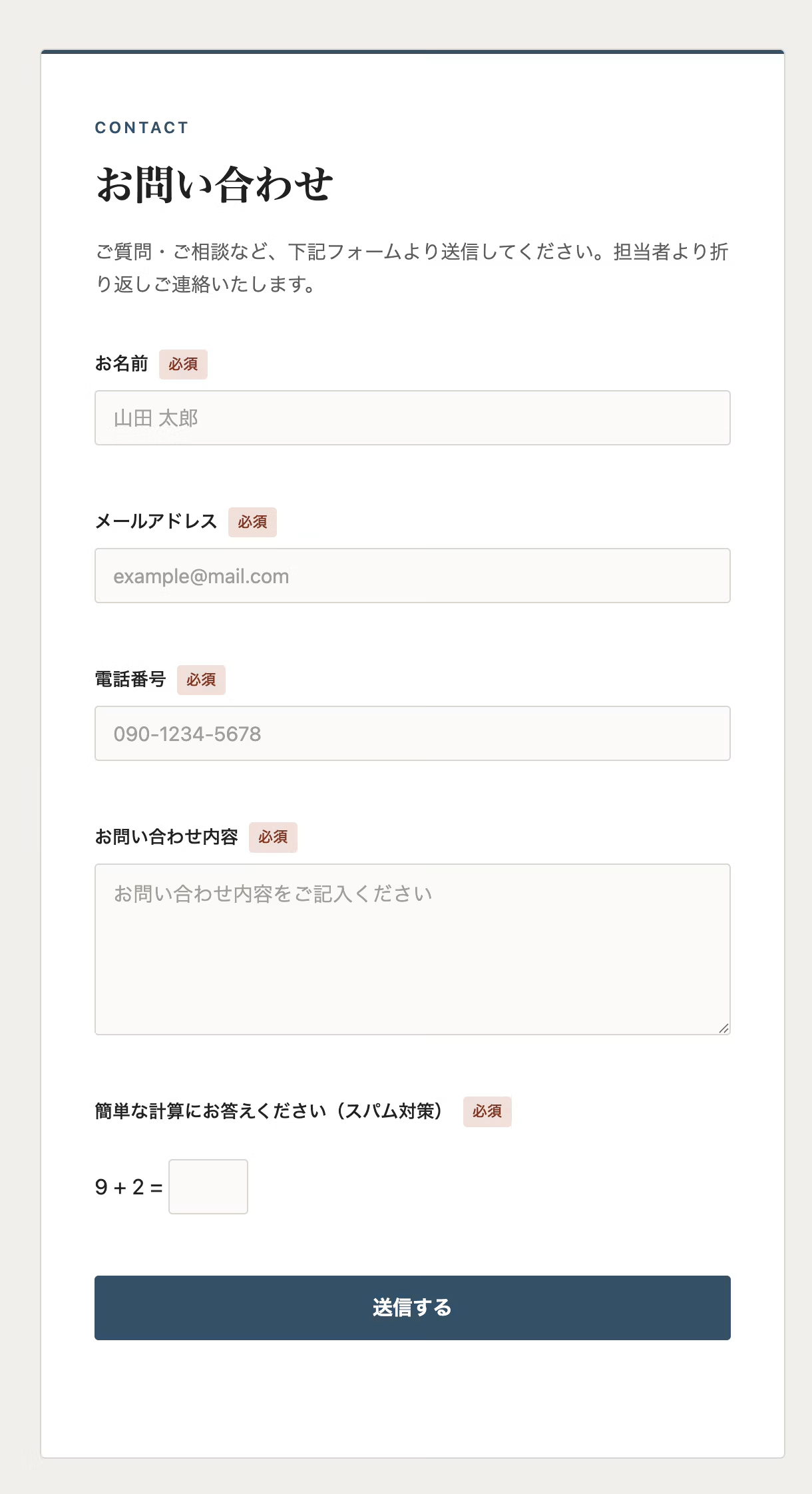
1. Use JavaScript to generate and display a random addition problem each time the page loads.
A simple calculation using Math.floor(Math.random()*9)+1 on both sides, randomly generated. Each time the page loads, JavaScript generates and displays a random number problem like '3 + 5 = ?' on the screen. The submit button remains disabled until the user enters the correct answer.
While this adds some friction for users, generic bots that don't respond to visual UI elements and just press the submit button tend to get caught by this method.
2. Honeypot field (invisible input field) for automatic detection
Create one hidden input field positioned off-screen using CSS, invisible to human eyes. Humans won't interact with this field when using the form, but bots that mechanically fill in all form fields and then submit will also fill in this field. So if this field contains a value at submission time, the submission is canceled.
This method is effective against bots that 'mechanically fill in all input fields on the form (regardless of visibility) and then submit.' This type of bot is very common, so it's a promising countermeasure.
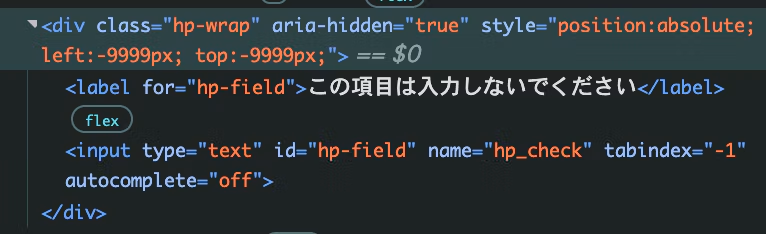
Since each type can detect different bots, combining both methods reduces the chance of missing any spam.
Direct POST-type spam that bypasses the website page remains unaffected—that limitation hasn't changed.
When Google Forms receive spam attacks directly without going through your website, you'll ultimately need to recreate the Google Form itself.
With that in mind, implementing this as a "mitigation strategy against some common bots" would be quite effective, wouldn't it!



I focus on frontend development with markup, JavaScript, React, and Next.js. I'm always happy when a site I've worked on goes live successfully! My hobbies are playing guitar, and I love cats and roasted sweet potatoes 🐱🍠
Hiraicchi
Frontend Engineer / Joined 2022