

Hello, I'm Otsuka, CTO at Liberogic.
"Is It Time to Say Goodbye to VPN?"
If you're handling IT duties on top of your regular job at a small company, you've probably had this thought at least once.
That was exactly where we were.
Zero trust, SASE, moving away from VPN...
We see these terms everywhere, but they tend to sound like something for large enterprises, and it's hard to know where to start.
With that in mind, Liberogic, a web development company with about 10 employees, moved from VPN to a zero trust architecture.
In this article, we want to share our hands-on experience, covering why we made the switch, what changed, and the weak points as well.
Signs That VPN Has Reached Its Limit
For a long time, we used the VPN feature on our office router.
It was a common setup: from home or on the road, you first connected into the company network, then accessed the internet from there.
Over the past few years, however, a few concerns kept coming up.
- The rule "Connect to VPN before working outside the office" was really just a request that people could easily forget
- VPN connections don't always work on the Wi-Fi at cafés, business trip destinations, or client offices.
- Web meetings and cloud file sync all ran through the company line, making everything slow
- A router's job is to pass traffic through, and it won't block dangerous sites for you.
If any of these apply to you, it may be a good time to reconsider your setup.
The point that bothered me most was that we couldn't make staff always use the VPN.
The built-in VPN on macOS has to be connected manually each time the device starts up.
When a device is left unconnected, its traffic goes straight out from whatever network it's on, with no protection at all.
The risks of untrusted networks are growing
There is also one recent incident worth noting.
In October 2026, it was revealed that the private keys for eight intermediate certificates from India's certificate authority eMudhra had been compromised.
According to Cloudflare's explanation, the keys themselves were weak, meaning forged certificates could be created for any domain.
Note that these certificates were widely trusted by browsers and operating systems.
When I assessed the risk of connecting to unfamiliar Wi-Fi, I considered it relatively low since most traffic now uses HTTPS rather than HTTP. However, I've realized this part needs a closer look.
A quick overview of Zero Trust / SASE / ZTNA
When you start researching, this is where confusion usually begins. For a small company, I think this level of understanding is enough.
Term | In short |
|---|---|
Zero Trust | A way of thinking that does not assume something is safe just because it is inside the company, and verifies every connection each time. |
ZTNA | A mechanism that verifies people and devices before allowing access to internal systems and apps. It can replace a VPN. |
SWG | A mechanism that inspects internet traffic and blocks access to dangerous sites. |
SASE | A concept of delivering network and security functions together as a cloud service. |
Zero Trust is the name of a concept. The services that put it into practice take forms such as ZTNA and SWG, and the overall picture that brings them together is SASE.
Rather than feeling pressured to adopt SASE, I think a small company is better served by starting from what problems it has with VPN and what it wants to solve.
We had almost no internal business systems.
The typical use of a VPN is probably accessing internal business systems and file servers from outside the office.
However, we have hardly any such internal infrastructure. The tools we use for work are almost entirely cloud services. As a result, we did not have the concern of "how to replace the entry point to internal systems."
For companies with internal business systems, this is likely where the discussion starts.
What makes migration tricky is the "fixed IP"
For web agencies, client servers often restrict access to admin panels and SSH so that they can only be reached from a specific IP address. It's a security measure, and a very sound practice.
Over the years, we have asked many clients to allow our company's fixed IP address. In a sense, this configuration is an asset we have built up over time.
Zero Trust services do offer a way to send traffic from a fixed IP.
Cloudflare also has a "dedicated egress IP" feature, but it is an add-on to the Enterprise plan and requires a large-enterprise contract.
For a small company like ours, it was hard to use.
Moreover, if the outbound IP changes, we would have to ask every client to update their settings again.
That is not realistic.
So we needed three things.
- Protect everyone, wherever they are, without missing any connections
- Regular traffic should not have to route through the company network
- But traffic to required destinations should still leave from the company's fixed IP, as it always has
Our choice: keep defense in the cloud, but keep the fixed IP for outbound traffic for now
We chose Cloudflare One.
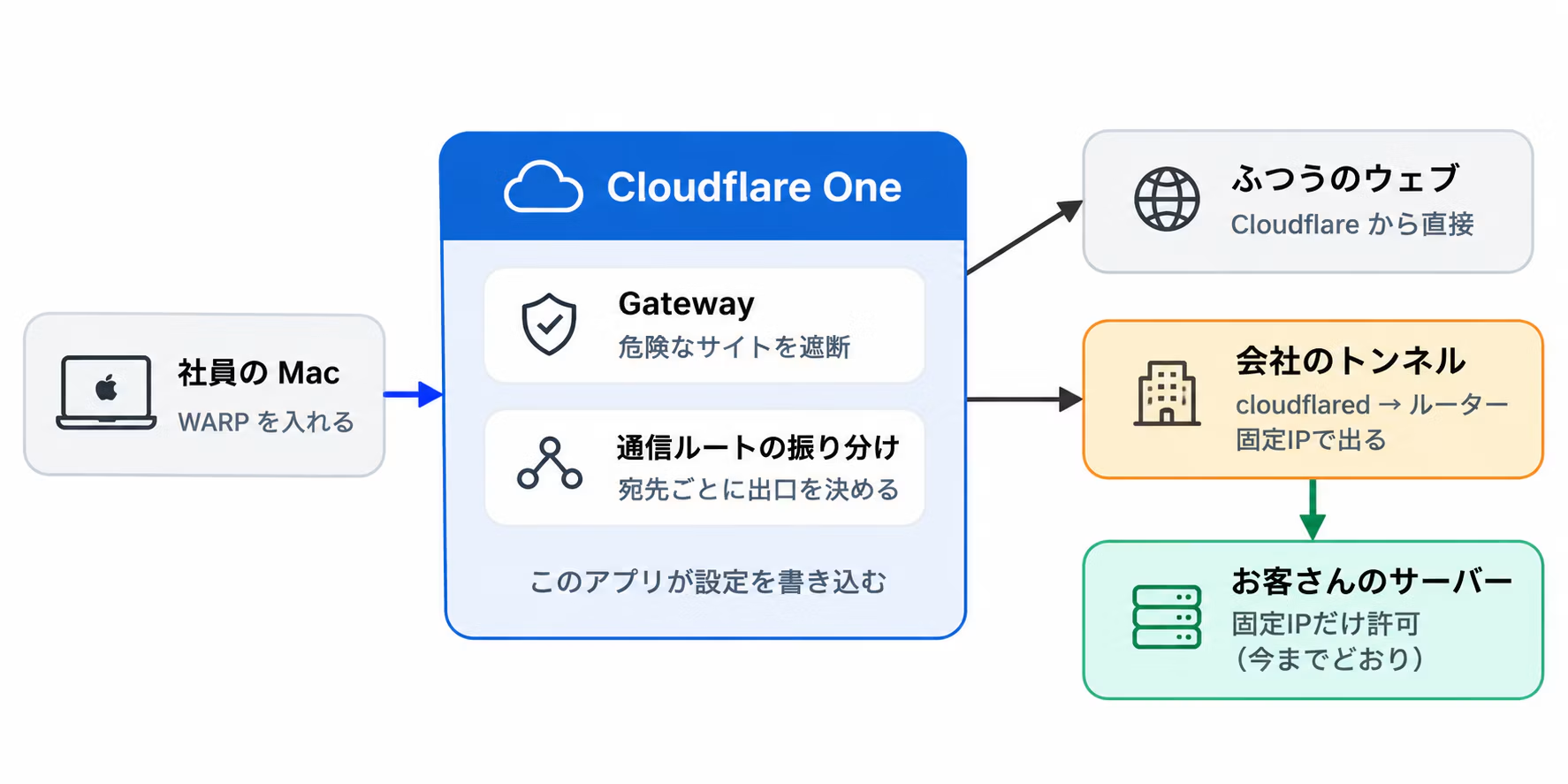
- Install the WARP app on each PC: once it's running, it stays connected, so it's less likely that someone forgets to connect
- Gateway blocks connections to dangerous sites: connections linked to malware and phishing sites are blocked company-wide under a single policy
- Regular traffic goes straight out from Cloudflare: it doesn't pass through the office network
- Only traffic to client servers exits through the company's fixed IP: a small device is placed on-site and connects to the company through a path called Cloudflare Tunnel
The deciding factor for us was the last point. You can specify, destination by destination, that "this destination must go out through the company network."
From the client's perspective, access still comes from the same fixed IP as before, so they don't need to change any of their settings.
Internal machines simply connect outward to Cloudflare on their own, so there's no need to open ports on the router, and no new entry points into the company network from the outside.
Of course, when an issue like the intermediate certificate problem occurs, not having to rely solely on people's attention is a major benefit.
In the eMudhra case as well, Cloudflare advised that customers using Gateway and the latest client are protected automatically.
What changed
Until now | Now | |
|---|---|---|
Working outside the office | Connect to VPN before working | Just open your PC |
Forgetting to connect | Happens | Hard to prevent |
Dangerous sites | Relying on each PC's security software | Blocked by company-wide rules |
Web conferencing and cloud services | All traffic goes through the company network | Bypasses the company network |
Customer servers | From the company's fixed IP address | From the company's fixed IP address (no change) |
WARP starts automatically and connects as soon as the Mac boots up. Staff don't need to remember how to connect to a VPN or worry about detailed settings. Strengthening security often adds work for people on the ground, but this time the workload actually went down. The ease of use was the thing that surprised me most after we deployed it.
You can also build internal apps that can only be accessed through WARP
Cloudflare One includes a feature called Access, which lets you restrict who and which devices can open a web app. With it, you can build an app that can only be opened from devices connected to your company's Cloudflare One through WARP.
For example, access can be allowed only when both of the following conditions are met.
- Signed in with a company email address
- Connected to Cloudflare One via WARP
Even if someone learns the URL, it cannot be opened from devices that do not meet these conditions. This achieves something close to placing internal systems "inside the VPN" without using a VPN.
Applications running on internal servers can be protected in the same way by connecting them with Cloudflare Tunnel, without opening any ports.
The internal management apps introduced next are also protected using this approach.
We also built small management apps in a DIY spirit
One challenge remained. Each time a client's server was added, a registration was needed to route its traffic through a fixed IP address. However, the Cloudflare dashboard is full of technical jargon, and a single configuration mistake can affect everyone's traffic. At the same time, we could not give administrator privileges to everyone.
So we built an internal app that lets staff register destinations simply by choosing a purpose.
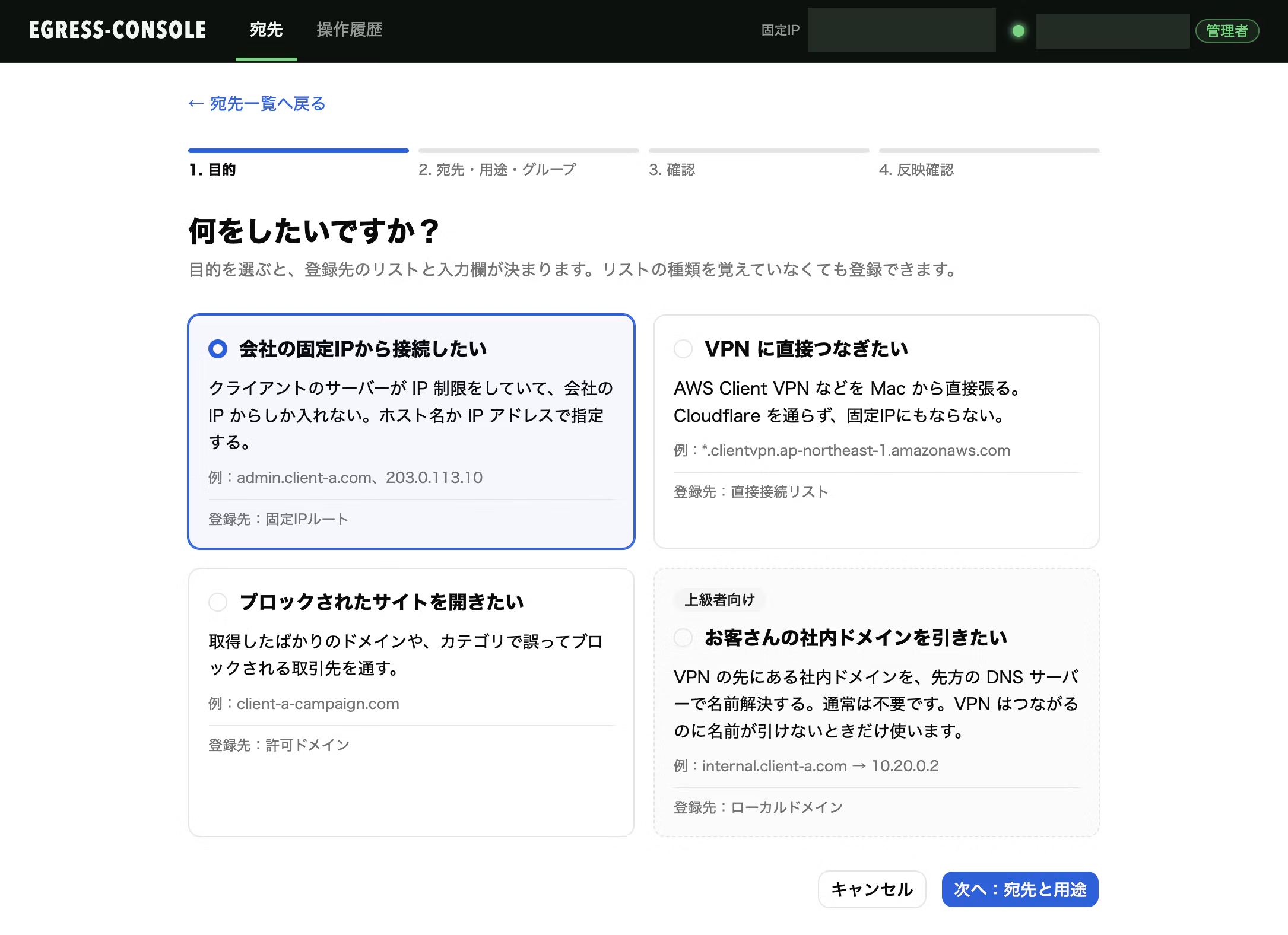
- It keeps a record of who registered what and for what purpose.
- Services used across the entire company, or scopes that are too broad, cannot be registered.
- After registering, you can check right away whether the changes were actually applied.
Because Cloudflare settings can be controlled through its API, we can build internal tools like this as well. We build web apps regularly, so this is an area where we're strong.
About the costs
Cloudflare One includes a free tier for up to 50 users.
It uses the same user allowance as Cloudflare Access, which handles login management for internal tools, so if your company already uses Access, it's even easier to give it a try.
Beyond 50 users, you move to a paid plan, with a public list price of $7 per user per month.
You can keep your current line with its fixed IP.
All you need in addition is one always-on machine on your internal network.
We prepared a small dedicated PC for this.
To be honest, it's not a cure-all
Since it's not good to only highlight the positives, here are some points to keep in mind.
- If the tunnel goes down, you lose access from your fixed IP: if the internal small PC or the line goes down, you can't reach your client's servers. Regular web access still works, but you must have notifications that alert you when something stops.
- Greater dependence on Cloudflare: authentication and traffic routing both converge on a single vendor. That convenience comes with a trade-off.
- Each PC needs to be set up: installing WARP and configuring certificates is a one-time task per device. Smartphones require more manual work.
- Coexistence with a client-specified VPN requires verification: depending on routing and DNS settings, Gateway protection may stop working. We provide setup instructions in our connection manual.
- It does not inspect the contents of traffic: we do not perform TLS decryption. If you need to inspect all traffic in detail, a different approach will need to be considered.
- The free tier does not come with extensive support: troubleshooting is basically up to you. On the free tier, log retention is also limited to a maximum of 24 hours.
Who this is a good fit for, and who it isn't
We think this works best for companies like these.
- Teams of a few to several dozen people, with some members working outside the office or remotely
- Those who cannot give up IP-based access restrictions with fixed addresses
- Companies that rely mainly on cloud services and have few internal servers
- There is at least one person with experience who can test things while looking up information.
On the other hand, in the following cases, we recommend considering other products or consulting a specialized company.
- Industry rules require long-term log retention or detailed inspection of communications
- Many devices are not managed by the company, so software cannot be installed on them
- There is no one available to respond when the tunnel goes down
Summary
Until now, we had staff install antivirus software on their Macs without specifying detailed settings. This time, along with deploying Cloudflare One, we set up the macOS configurations and the antivirus software settings in-house.
However, as attacks targeting creators and developers intensify, protecting against them is not the only thing we need to focus on. At Liberogic, we are also working on the following.
Managing dependencies
In light of the growing number of supply chain attacks targeting developers, we are reviewing how packages are added and updated, and the verification steps involved, rather than simply updating to the latest version.
Handling secrets
We manage API keys and SSH keys using rules set up in 1Password, and we avoid leaving them in plaintext in development environments wherever possible.
Minimizing and reviewing permissions
Client environments, as well as accounts, keys, and permissions for various services, are limited to what is necessary and are not retained after a project ends.
Sharing what we learn
We use real, publicly disclosed incidents as material for internal study sessions, and think through whether the same thing could affect us, bringing each case closer to our own environment.
Of course, we need to be careful not to cause major incidents. But since our company is small relative to the number of large clients we work with, we must consistently maintain a certain level of security standards.
None of this is flashy, but we are steadily building up what we can do.
We hope this will be helpful to other companies facing similar challenges.



The backbone of Liberogic's technical division. Whenever he hears someone say, "I wish we had something like this, it would be so handy," he adds his own ingenuity, turns the idea into added value, and gets it implemented in no time. A highly sociable team member who has many fans among our clients, he is a treasured asset to our company and a devoted cat lover.
Sho Otsuka
Director, CTO / Chief Engineer / Representative, Nekoana LLC / Looks unreasonably young