

As the fourth installment of our web accessibility extension series, we have released "Area Flash Checker," a Google Chrome extension.
Building on the "area analysis" approach introduced in our first tool, "Area Contrast Checker," which lets you drag to select an area and analyze it as it appears, this release extends that approach to motion.
Based on WCAG Success Criteria 2.3.1 and 2.3.2, you can check flashing content on a page while it is still moving.
Background: Easy-to-Miss, Hard-to-Verify Flashing Content
Intense flashing and red blinking can trigger photosensitive seizures.
In Japan, the 1997 broadcast of a TV animation, which caused many viewers to report feeling unwell, is widely known as an example.
WCAG sets flash-related criteria at Level A, the most basic conformance requirement.
Flashing severe enough to violate these criteria does not occur often on websites, but when it does, it directly affects users' health.
Flashing is not limited to video; it can also occur with CSS animations, Canvas-based effects, and advertising slots.
Until now, flash checking has relied on video file analysis tools, such as PEAT.
These tools are mainly designed to check video assets during production.
To verify a website after it has been implemented, users had to screen-record the page, convert the video file, load it into the tool, and repeat this process after every fix.
"When I spot a suspicious motion, I want to check it right away."
Development started from this shared frustration on the ground.
Measure content in motion on a page without recording
Simply drag to select an area (or target the entire view) and capture for 5 to 60 seconds.
Because it analyzes rendering frames directly, it counts general and red flashes exactly as users actually see them.
CSS animations, videos, Canvas, GIFs, carousels, advertising slots, and more can all be checked using the same steps.
Note: If you need to audit a completed video file itself, a tool that analyzes video files is more suitable.
This tool is positioned as an option for quick checks during production and diagnosis.
Key Features
1. Evaluation of WCAG Success Criteria 2.3.1 and 2.3.2
Displays Pass/Fail results for general flash and red flash under "Three flashes or below threshold" (Level A) and "Three flashes" (Level AAA).
- General flash
A single cycle in which relative luminance increases or decreases by 0.1 or more and then reverses. A cycle is counted only when the darker side has a relative luminance below 0.80. - Red flash
As defined in WCAG 2.1 and later, a transition to or from saturated red (R/(R+G+B) ≥ 0.8) with a chromaticity difference greater than 0.2 on the CIE 1976 UCS. - Area threshold
The 21,824 CSS px² recommended by WCAG (25% of 341×256 px).
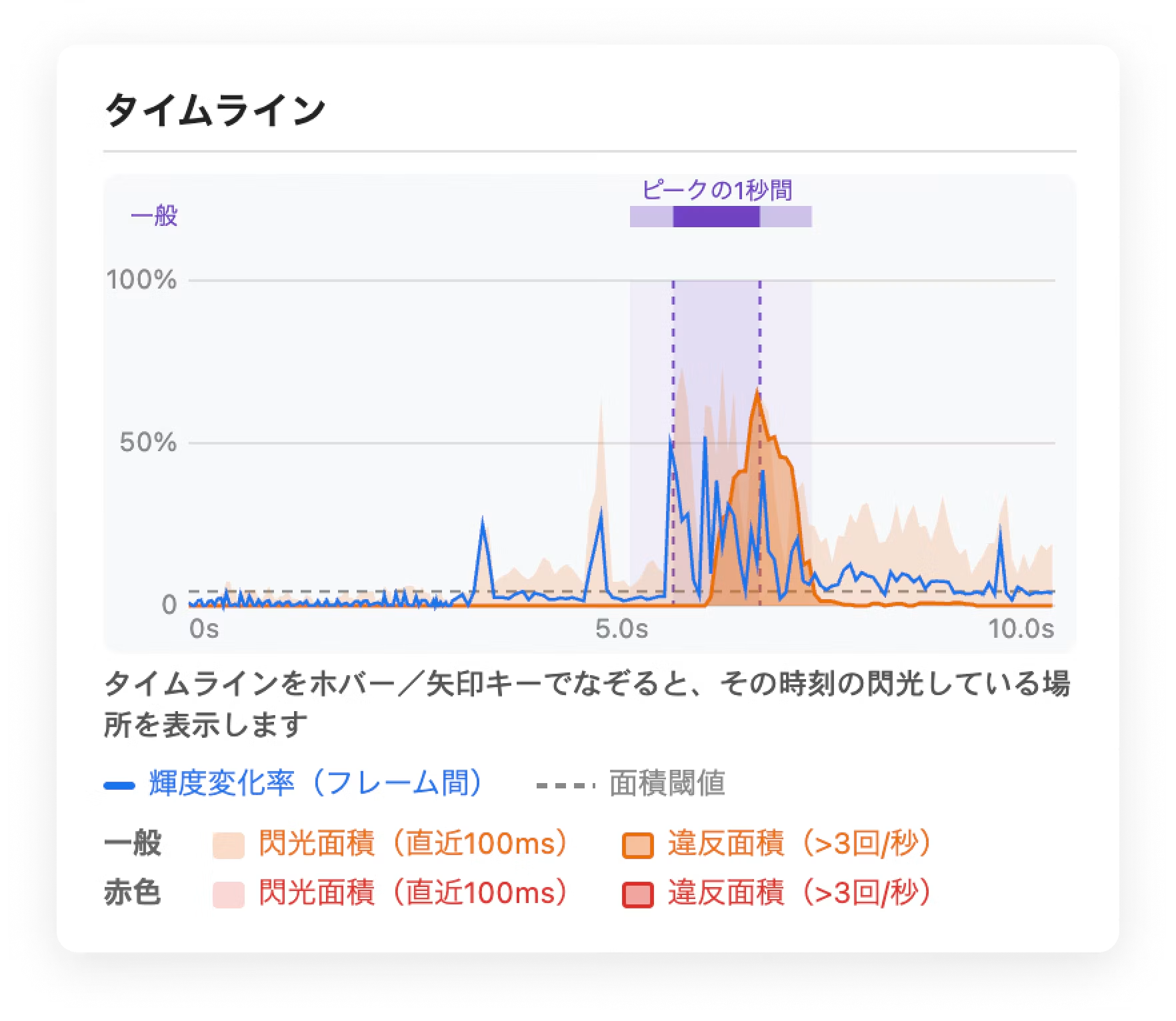
Result cards also show the maximum number of flashes per second, a comparison of the violating area against the threshold, and the time range where the limit was exceeded (the peak one-second window).
2. Timeline and Flash Map
The timeline displays changes in luminance change rate, flashing area, and violating area over time. Hover over the timeline or use the arrow keys to move through it, and the frame preview will overlay which parts of the selected area were flashing at that moment.
3. Considerations for Use on Actual Pages
- Requests capture at 60fps and displays the effective frame rate. Shows a warning when rapid flashing may be missed.
- Automatically supports Retina / high-DPI displays and browser zoom.
- To prevent false positives, thin structures such as fine lines and text edges are excluded from area calculations by default (can be disabled for measurement targets that require them).
- Designed so that measurement overlays do not appear in captures.
4. Accessibility of the Tool Itself
Compatible with screen readers, announcing the measurement status and results. We have also considered usability as an accessibility tool, including keyboard operation of the timeline and the ability to return from any stage by pressing the Escape key.
Note: No data is collected or transmitted externally. Captured frames are analyzed in browser memory and discarded immediately afterward, so you can use it with confidence on unpublished pages and in internal environments.
Download Area Flash Checker here
At Liberogic, we aim to make accessibility a baseline standard of quality rather than a special consideration.
Flashing is one of the areas that is difficult to judge with automated diagnostics that analyze HTML and CSS, and requires human verification.
Get an overview with the automated diagnostic tool Lente Scan, verify individual items with the extension, and make the final conformance judgment through a manual diagnosis by experts, Lente Audit.
Combining automated diagnostics, on-site tools, and expert manual diagnosis supports continuous accessibility improvement.
Making accessibility more approachable and smoother.
We will continue to deliver tools and services that give shape to the voices of the field.


