

What should your application log, and how much?
Hello, I'm Otsuka, CTO at Liberogic.
Last time, we compared logging features across services like AWS, Cloudflare, Vercel, Supabase, and headless CMS.
Each service provides execution logs, error logs, and records of administrative operations.
So if you combine them all, does that cover every log your web service needs?
Unfortunately, it's not that simple.
The logs that cloud services automatically maintain are different from the logs your application must record on its own.
This time, we'll walk through how to think about log design in actual web services, focusing on practical implementation.
What service-side logs alone cannot reveal
If you use Cloudflare Workers or Vercel Functions, execution results and errors are logged automatically to some extent.
With Supabase, you can check logs for the database, authentication, API, and more.
However, what the service can track is limited to events that occur within that service itself.
Automatically retained | Logged on the app side |
|---|---|
Worker or Function execution | Inquiry receipt |
Exceptions and processing errors | Member information changes |
API response | Permission changes |
Database connection | Email send success or failure |
Cloud environment management operations | Spam detection or business-level rejection |
For example, even if you know that a database write succeeded, you cannot tell whether it was to 'accept an inquiry' or 'update member information.'
Such business events need to be recorded with meaning assigned by the application side.
Not everything should be logged
You might want to log as much information as possible to prepare for investigation.
However, more logs are not always better.
Recording every operation in detail buries the information that truly matters. As log volume increases, so do the costs of storage and retrieval.
For this reason, we design our logs with an awareness of the "boundaries" in processing.
For example, in the case of a contact form,
- Submission succeeded
- Rejected due to invalid input
- Rejected as spam
- Database save failed
- Notification email failed to send
We record these points where the processing outcome changes.
Rather than preserving every minor variable and operation along the way, we select the events necessary to trace the sequence afterward.
Logs are retained as data, not as narrative.
It's more useful to include searchable information in logs rather than just writing 'an error occurred'.
Item | Role |
|---|---|
Timestamp | Check when the error occurred |
Event name | Categorize which process encountered the issue |
Severity | Distinguish between success, warning, and failure |
Target ID | Identify the affected data |
Request ID | Track a series of operations |
Processing time | Identify delays or performance degradation |
Recording such items in a consistent format is called structured logging.
By organizing items in a format like JSON, you can easily search—for example, to review only processing for a specific application ID, or extract only email sends that resulted in errors.
Do not write personal information to logs
When keeping logs of contact form submissions, some cases record full names, email addresses, and the message body itself.
This may seem convenient for investigation, but it is a design choice to avoid.
Write to logs | Do not write to logs |
|---|---|
Processing date and time | Password |
Event name | Access token |
Success or failure | Cookie |
ID of target data | Inquiry message body |
Request ID | Credit card information |
Processing time | Unnecessary personal information |
Logs may be forwarded to multiple services or retained for extended periods. If they contain personal information or authentication credentials, the logs themselves can become a new source of data breaches.
Store operational data such as inquiry details in a database, and record only the inquiry identification ID and the fact that the submission was successful in the logs.
When needed, use that ID to cross-reference the information on the database side.
Thinking through contact forms
Many contact forms are structured to simply send a notification email.
However, even if email transmission succeeds, it's not guaranteed that the recipient will actually receive it.
For this reason, it's safer to save the contact details to a database first and treat email as a notification to the person in charge.
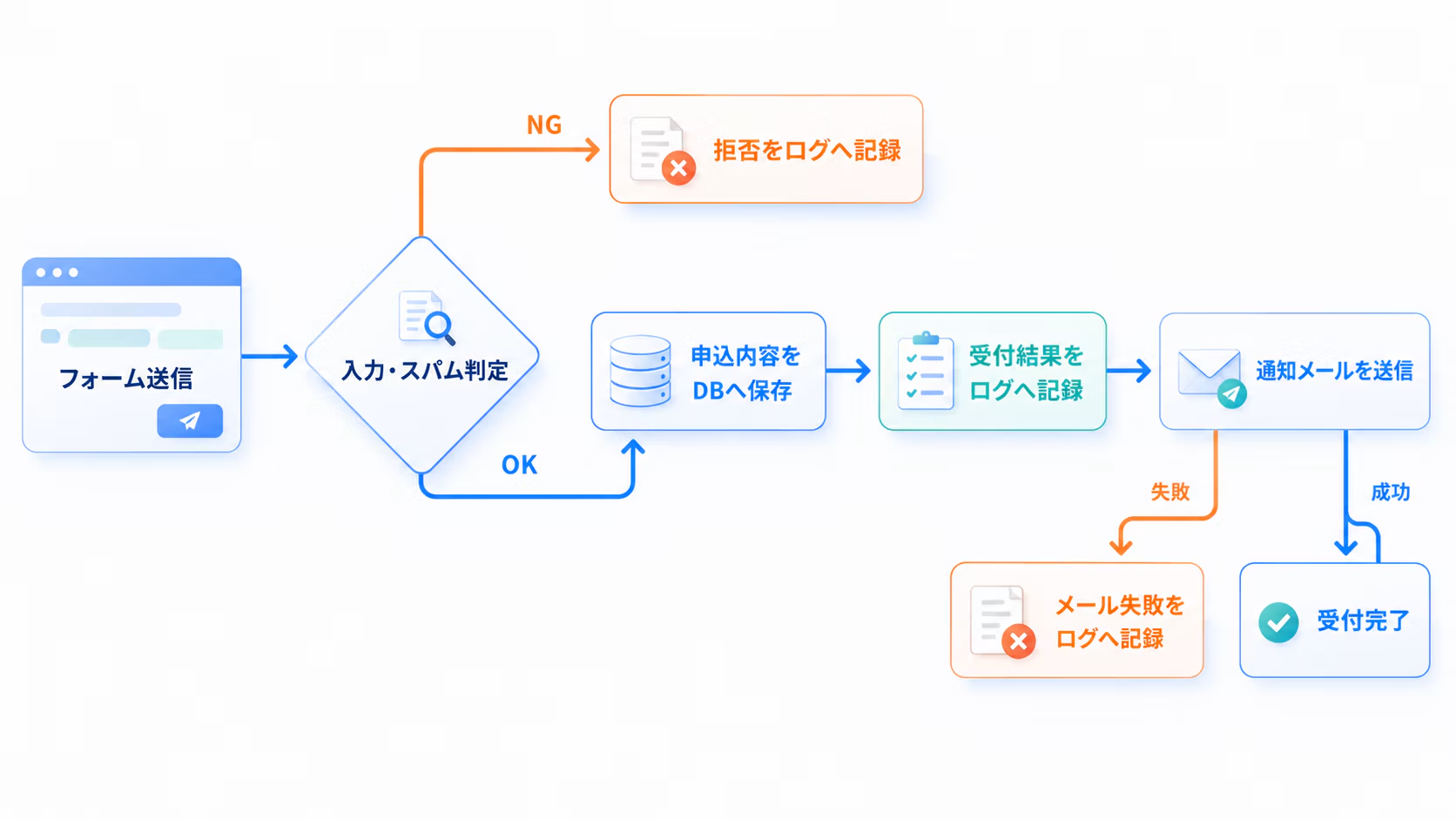
With this structure, you can distinguish between "the inquiry itself didn't arrive" and "the inquiry was saved but only the notification email failed."
These subtle differences turn out to be very important when actually handling inquiries.
Separate short-term search from long-term storage
In day-to-day incident investigation, the ability to quickly search recent logs is critical.
On the other hand, logs for audits and incident investigations may rarely be accessed during normal operations, but need to be retrievable months or years later.
Storage destination | Primary purpose |
|---|---|
Log dashboards for each service | Recent operational verification |
Log management services like Datadog | Cross-service search, monitoring, and alerting |
R2 or S3 | Long-term audit trail storage |
Keep recent logs in an easily searchable location, and move long-term audit trails to cost-effective storage.
Simple, but in practice this separation makes a significant difference.
Logs and dashboards are separate things
If you have logs, you might think you can see everything—access counts, error rates, and more.
However, logs and dashboards serve slightly different purposes in what they reveal.
- Logs: Investigate individual events in detail
- Metrics: Aggregate counts, percentages, processing times, and more
- Dashboard: Understand system-wide trends
Use the dashboard for daily status checks, and dive into logs to investigate when anomalies are found.
Combining these two approaches makes operations more manageable.
Key decisions to make upfront
Finally, here's a summary of the items to clarify when designing your log strategy.
- Events to log
- Items to include in logs
- Exclude personal information and authentication credentials
- Period for searching recent logs
- Range of Logs to Retain Long-term
- Long-term log storage location
- User with log viewing permissions
- How to Delete Logs Past the Retention Period
When you hear the term "audit log," you might feel compelled to record every operation and implement a large-scale log management infrastructure.
On the other hand, for typical websites and media sites, you can start by first defining critical operations and processing results, then separating short-term search from long-term storage.
What matters is not listing the logging features of the services you use, but looking at whether the system as a whole retains the records you need.
What to log.
Why you're logging it.
How long to keep it.
Clarifying these three points makes it easier to design logging appropriate for your project without building an unnecessarily complex setup.
Logs are usually not very visible.
But whether you can explain what happened when something goes wrong depends entirely on how you designed logging from the start.
Getting these practical foundations right from the beginning really does make a difference.
Well then.





The backbone of Liberogic's engineering division. When she hears "I wish we had something like this" or "that would be so convenient," she instantly implements it with added value using her natural ingenuity. Our company treasure with excellent communication skills and many fans among our clients—and a devoted cat lover.
Sho Otsuka
Director/CTO / Chief Engineer / Representative Director of Nekoana LLC / Looks suspiciously young