

What Should You Record in the "Audit Log" You Often See in Competitions?
Hello, I'm Otsuka, CTO at Liberogic.
When participating in web development competitions, you often see requirements stating "must be able to acquire audit logs" or "logs must be retained for a certain period."
To meet those requirements, we select services, change plans, or add log storage options. But what exactly does "audit log" refer to in the first place?
In this article, I'll try to clarify that a bit.
There Are Many Types of Logs
Even though we use the single term "log," there are actually several different types.
Log Types | Primarily Recorded | Primary Use Cases |
|---|---|---|
Access log | URL, timestamp, status, source address, and more | Investigation of usage patterns and incidents |
Application log | Process start/end events and business transactions | Verification of functionality and troubleshooting |
Error log | Exceptions, abnormal termination, and error details | Identification of failure causes |
Audit log | Who did what, when, and where | Internal controls and audit trail preservation |
Security logs | Authentication, access denial, and attack detection | Incident investigation |
They are all logs, but the content recorded and the purposes they serve differ.
For example, records of operations like an administrator changing user permissions or a team member publishing content are what we typically call audit logs.
Separate troubleshooting and audit trail preservation
Logs serve two main purposes.
One is for investigating the cause when a failure or malfunction occurs.
You use it when investigating inquiries like 'I submitted a form yesterday but didn't receive it' or 'Errors occurred only during a specific time period.'
The other type is a log for verifying operational facts after the fact.
Records such as "who changed the settings," "when content was published," and "what operations were performed in the admin panel."
Comparison items | Troubleshooting and improvement | Audit and record preservation |
|---|---|---|
Primary users | Developers, operations staff | Auditors, security staff |
Typical viewing period | The past few days to several weeks | Several months to several years |
What to prioritize | Searchability and information volume | Completeness and long-term retention |
Access frequency | Check daily | Retrieve when needed |
These two have different retention periods and use cases.
Storing all logs in a searchable state for a long period increases costs significantly. Conversely, if you retain only recent logs, audit and incident investigation records may disappear when you need them.
Separating these concerns from the start leads to a more sustainable design.
Translating audit log requirements into specifications
The term "audit log" alone does not determine the specific structure.
First, we clarify the purpose and then determine the necessary records and storage methods.
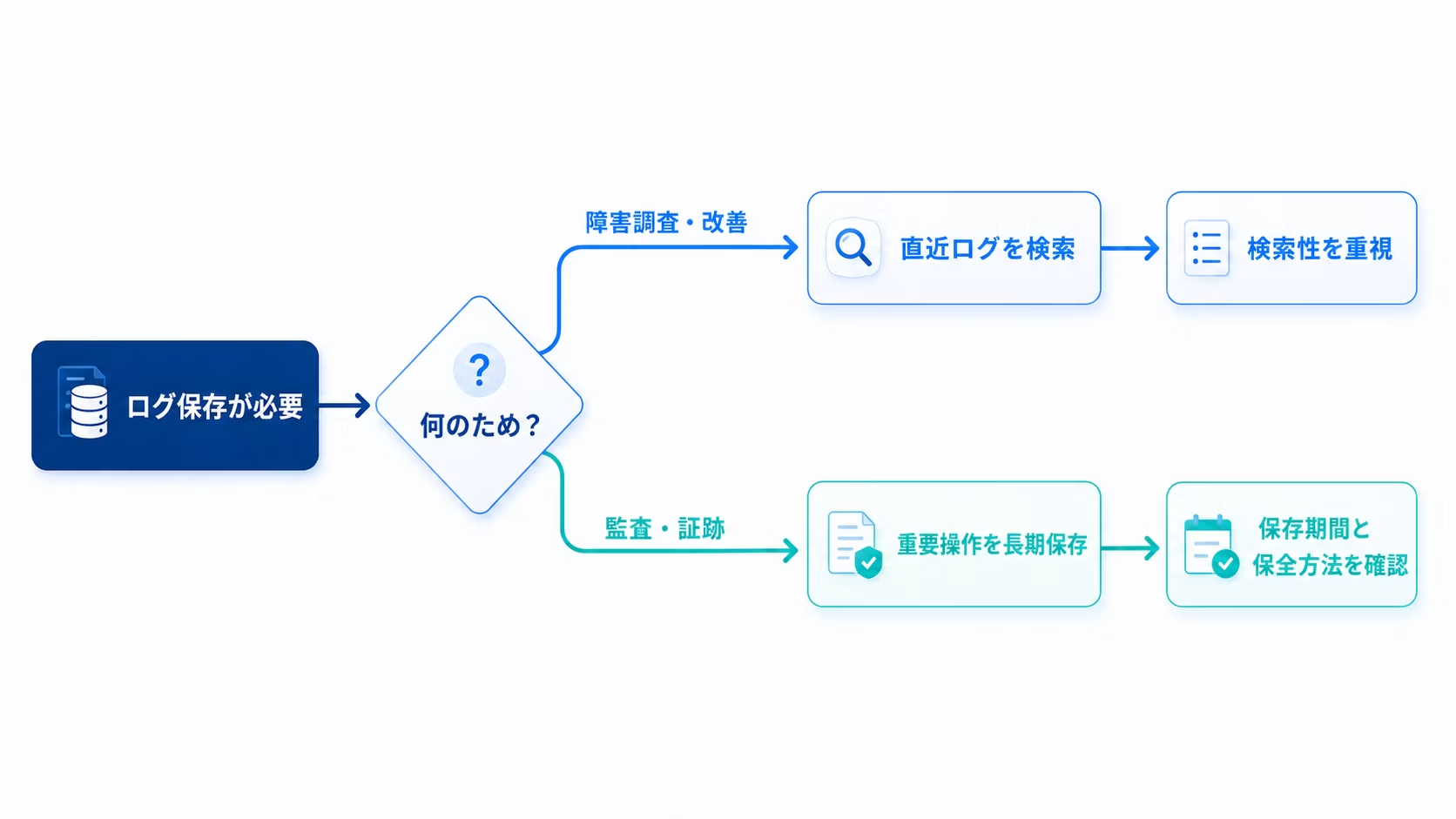
Just being able to collect logs isn't quite enough
If logs are displayed in a cloud service's management dashboard, it's easy to assume that "we're already collecting logs."
However, the content and retention period vary depending on the service.
- Errors remain, but not until administrator action is taken.
- Visible in the admin panel but disappears after a certain period
- A higher-tier plan is required to forward externally
- Custom operations specific to your application need to be documented by your own team.
Records such as "who changed the product information" or "which application data was processed" may not be clear from cloud services alone.
If "audit logs" appear in the requirements for a proposal, here are at least some key points you'll want to confirm.
Requirements checklist
✅️ Which operations to log
✅️ User or administrator actions
✅️ Is the purpose troubleshooting or auditing
✅️ How long to retain logs
✅️ Do you need to search logs regularly
✅️ Who can view the logs
✅️ Does the log contain personal information
If you decide on a service or plan without understanding this first, you risk ending up with an unnecessarily complex setup, or conversely, missing critical logs you actually need.
In modern web services, logs are distributed as well.
With traditional web servers, it was relatively straightforward to keep log files stored within the server.
Today, it is increasingly common to build web services by combining multiple cloud services such as CDN, hosting, databases, headless CMS, email delivery, and more.
At Liberogic too, we use not only AWS but also Cloudflare, Vercel, Supabase, microCMS, Kuroco, and other services tailored to each project.
Since logs are also stored separately in each service, you need to look across the entire system and consider what data persists overall.
Start by clarifying your objectives
When someone says "audit logs are required," it often feels like you must implement a specialized service.
Of course, depending on your requirements, you may need external log management services or long-term retention systems. However, starting with a large-scale setup isn't always the right approach.
First, determine what to log, why you need it, and how long to keep it.
Once you've clarified these points, it's practical to separate what your standard platform features can handle from what requires additional implementation.
Next time, we'll take a rough look at what kinds of logs are generated by services we frequently work with — AWS, Cloudflare, Vercel, Supabase, headless CMS, and others.
Well then.



The backbone of Liberogic's engineering division. When she hears "I wish we had something like this" or "that would be so convenient," she instantly implements it with added value using her natural ingenuity. Our company treasure with excellent communication skills and many fans among our clients—and a devoted cat lover.
Sho Otsuka
Director/CTO / Chief Engineer / Representative Director of Nekoana LLC / Looks suspiciously young