
Building an app with AI is no longer all that unusual.
Not long ago, AI was mostly seen as a "capable assistant" that helped summarize text or brainstorm ideas. Lately, however, it is evolving into a "reliable partner" that can actually lead development itself.
As more of our members have started working with AI, the idea of "let's try building something ourselves" led to this app development project.
We initially wanted to build something useful for work, but the first idea that came to mind was not about work at all, but a hobby.
I've recently become hooked on watching movies, and I've been watching several every week. I had been jotting down upcoming titles and favorites in the Notes app on my iPhone.
However, the list was growing quickly, and many titles looked similar, so I often found myself wondering, "Wait, have I already seen this one?" Eventually, managing everything in Notes fell apart.
So I thought, "I might as well build my own tool," and that led to the "Movie Watchlist" I'm introducing here.
You can build an app that works even from a rough prompt
When people think about development with AI, they often imagine having to write a prompt that breaks everything down into detailed requirements.
Many people likely believe that only after organizing the background and specifications and conveying every requirement without gaps can you get something that actually works.
Of course, if you can provide the background and specifications all together, that's ideal. However, what I learned from this experiment is that even very rough instructions get implemented with a proper understanding of what you intend.
This may be partly because the app was simple, but a working app was built from a prompt that simply listed everything I wanted. Here is what my initial prompt looked like.
I want to create a movie watchlist.
Since it's just a prototype, please make it complete in a single HTML file so it runs immediately when opened in a browser.
As for features, I'd like users to be able to register a title along with where it's streaming (such as U-Next or Prime Video), and display all registered titles in a list.
Also, please add a way to mark titles as watched.
With traditional development without AI, even a simple project can easily eat up several hours on tasks like "design the UI," "choose the technologies to use," and "write the code." Claude, however, understood what I wanted in just a few minutes and handled everything from selecting the optimal UI and tools to implementation with ease.
The speed was so impressive that it was almost unsettling.
Once things moved this fast, my appetite grew. After the base was ready, I kept throwing every idea I had at it. My prompts weren't polished either. I just listed the points that bothered me and said things like "fix this here." If I were talking to a human engineer, they would almost certainly find it annoying.
After a few rounds of this casual back-and-forth, the overall structure of the watchlist was done in no time.
Including fine-tuning, it took about an hour to get the first draft of the app finished.
Build it the moment an idea strikes, and let it grow as we add to it.
A few days after the framework was in place, we held a session where everyone showcased the apps they had built with AI, giving me a chance to see what the other members had made. One person had built an app that incorporated "Gemini Nano".
The moment I saw it, I thought, "Wait, I also use Gemini to look for movies I want to watch. If I built that into an app, couldn't I find movies based on my watchlist?" I got back to development as soon as I got home.
If this were a human developer, they'd be upset that I kept adding features mid-development without permission. But this is where AI really shines: it handled the request effortlessly. It implemented the movie search feature in just a few minutes.
With the search feature working, my next concern was accuracy.
Initially, I kept things quite simple: the app relied only on the titles and genres of movies in my watchlist to suggest a few recommendations. As a result, while the genres matched, the suggestions often didn't align with my tastes. I tried several approaches, such as switching to recommendations based on movies I had marked as favorites, but the results remained the same.
I figured that titles and genres alone might not provide enough information, so I decided to include a plot summary for each movie. That said, I absolutely did not want to manually type out every summary. After some thought, I decided to rely on AI once again.
I reworked the app so that plot summaries are automatically registered based on the titles entered in the list. To improve summary accuracy, I had Claude write code that uses the Wikipedia API to retrieve relevant information for each registered title, and then has AI automatically generate a summary based on that information.
Honestly, there are still some rough edges in accuracy, and I'm considering eventually upgrading to integrate the TMDB API. That said, I've reached a level where minor mistakes are easy to overlook. The fine-tuning took only about two to three hours.
As an aside, when I later tried to use the app on an actual device, it turned out Gemini Nano wasn't available, so I ended up switching to the Gemini API. The free tier has request limits, but it provides access to better models than Gemini Nano, and accuracy improved significantly as a result.
A quick look at the finished app
We kept adding features as we went, and this is truly an app that grew through use. Before we knew it, it had come together with this many features.
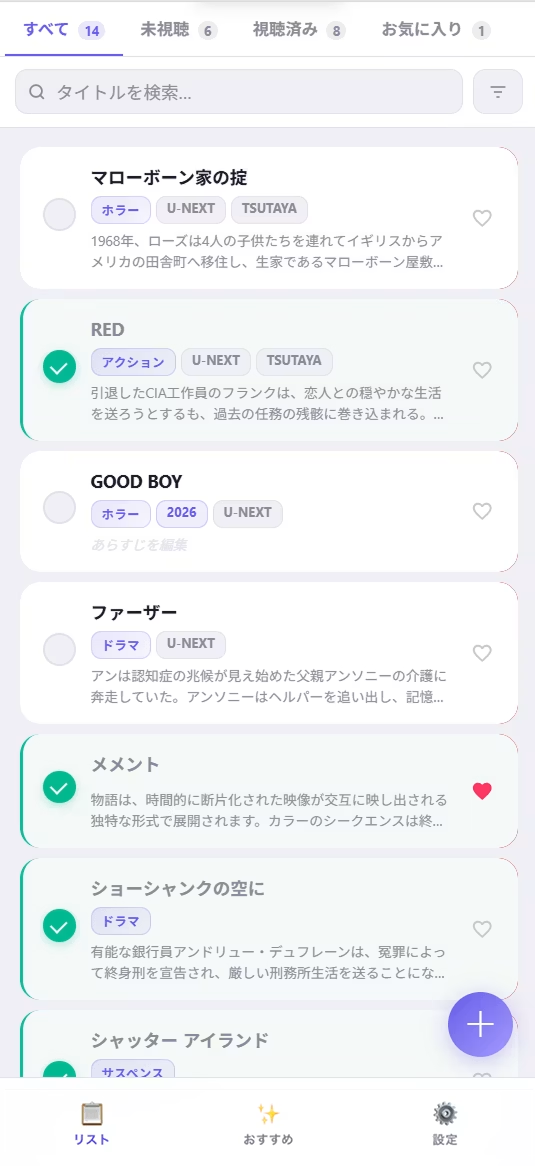
Watchlist
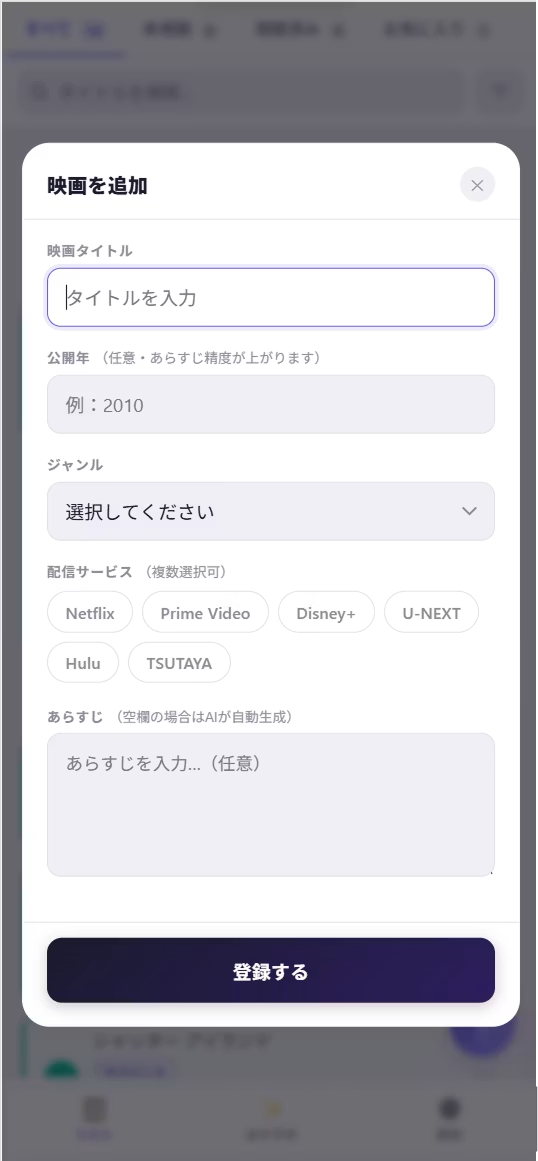
- Register movie titles, genres, streaming services, and synopses
- Automatic synopsis generation powered by various APIs
- Toggle between "Unwatched" and "Watched" status
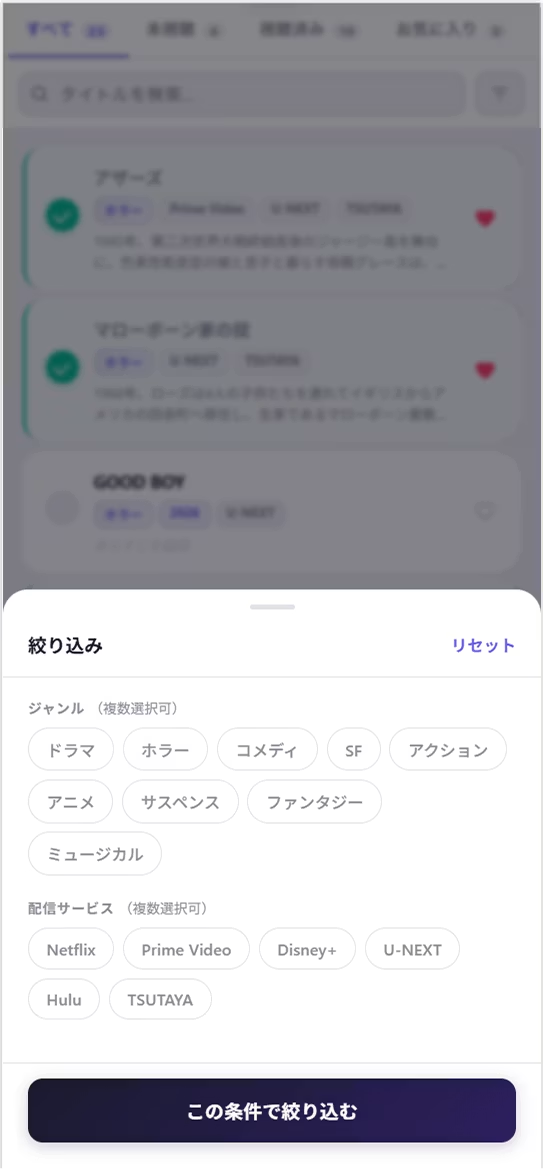
- Filter by genre, favorites, and unwatched/watched status
Title Search
- Gemini suggests movies based on your favorites
- Specify genre and number of suggestions
- Add recommended titles to your watchlist with a single tap
- Movies you've already watched can also be added to the list, marked with a watched status
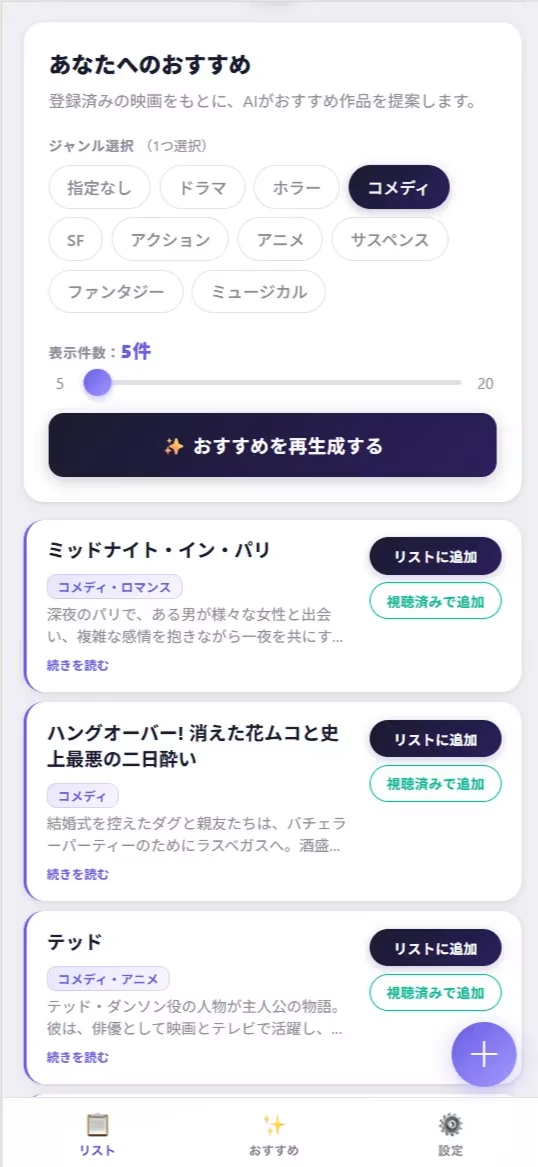
Tasks that were previously split between "finding movies" and "logging movies" are now consolidated into this single app.
I no longer have to explain my tastes to an AI every time I search, and I can find movies I'll enjoy whenever I want.
The watchlist, which was the original goal, can now be filtered by watch status, favorites, and genre, so managing it is far easier than when I used a notepad.
What I'm personally most pleased about is that if a search result is a title missing from my list, I can add it with a single tap.
I no longer have to type out the title and register it manually.
Summary
You may have noticed by now, but I didn't write a single line of code for this app. I simply told Claude in plain words what features I wanted, and it implemented everything.
The biggest takeaway for me was that I didn't need to decide on the finished form from the start. While using the app, I noticed things like "I'd like this too" or "this isn't quite right," and I communicated each of them to Claude as they came up. It felt less like building an app and more like nurturing one.
If you're hesitating because you think you need to write perfect prompts, just try throwing in something rough first. If the result isn't what you imagined, you can gradually refine it, and there's really no such thing as a failure. Once you've tried it, you should get a sense that it's more doable than you thought.
Please feel free to give it a try.



Currently working hard as a director who rose from new graduate hire! I'm striving to become a multi-talented professional who masters every field, from design to ad operations. At work, I aim for smooth, efficient direction, while in my private life I enjoy a homebound lifestyle in my fortress of a home. I happen to love anime.
Handan-chan
Web Director / Joined in 2022