

Since our company adopted Claude Code, I wanted to build a useful tool we could actually use at work. So I created a VSCode extension that monitors the editor for typos, tag mistakes, and other small errors!
"Wouldn't it be nice to have a feature like this?" Here is a summary of the process, from the initial idea to implementation!
Background
During implementation, I often make careless mistakes, like forgetting to include alt="" or mixing up full-width and half-width characters. These small errors are a constant frustration...
I imagined a tool like this would be helpful, so I started by describing the idea in a chat-based conversation.

I wanted an app that prevents these careless mistakes, for example, one that highlights differences right in the browser or points out errors in the code!
- Code Review Checklist | A custom checklist to verify before submission
- HTML/CSS Visual Diff | Paste two code snippets to visualize the differences
- Screenshot Diff Checker | Pixel-by-pixel comparison of before and after images
- Live HTML/CSS Error Reviewer | Just paste your code and AI points out issues
It proposed a few ideas, so I decided to submit additional requests.

Having AI point out issues is great! However, instead of pasting code, I'd like it to monitor in real time within VS Code and allow me to review results after finishing my work!
We decided to build it as a VS Code extension rather than a browser app.
Since real-time monitoring appears to be costly in terms of API usage, we adopted a post-task review triggered by command execution.
Claude API was initially proposed, but it requires a paid plan, so we decided to use the GitHub Copilot subscription we already have.
In overview, this extension retrieves the git diff after a task is completed, sends a prompt to GitHub Copilot, and automatically detects careless mistakes.
How It Works
After finishing your work, click the status bar button
↓
Get the diff against git diff HEAD and compare changes
↓
Parse the diff to extract changed files and line numbers
↓
Send the diff and prompt to GitHub Copilot (vscode.lm API)
↓
Copilot returns the review results in JSON format
↓
Display the review results in a VSCode view
↓
Click a line number in the findings to jump to the relevant file and line
↓
Accumulate the patterns the AI detects
Here's what the screen looks like.
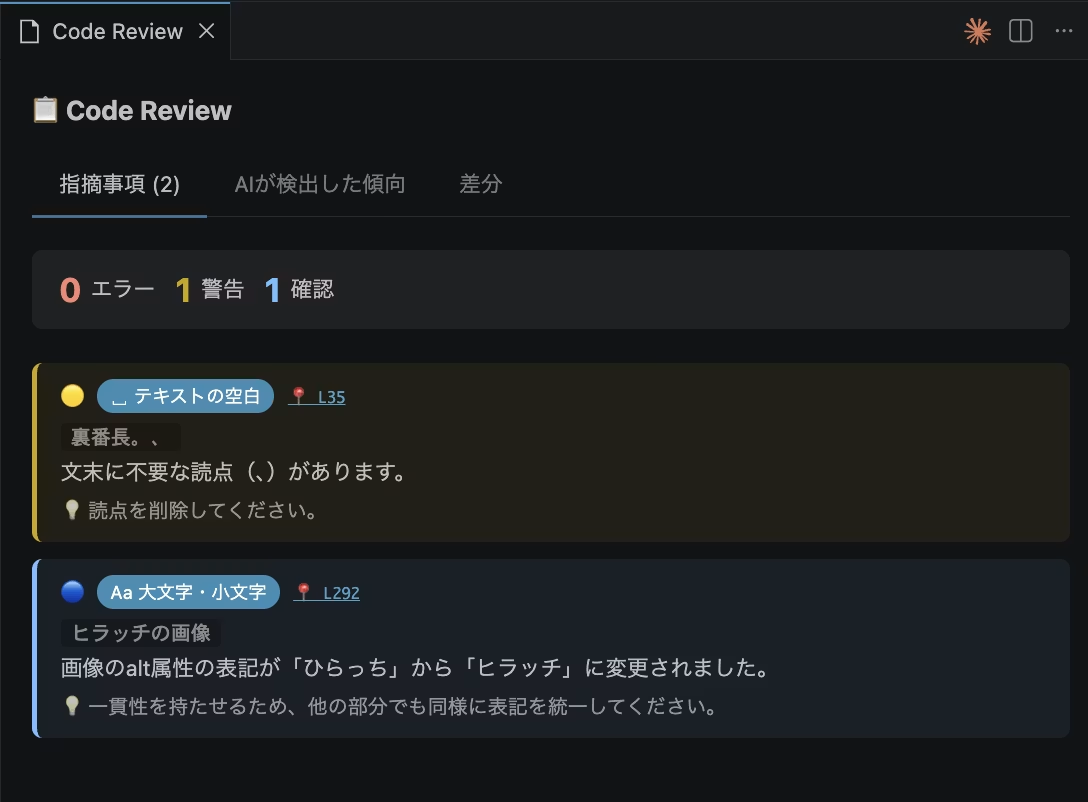
Once you've finished your work, launch the Code Review extension before committing to GitHub. It compares the diff against the previous commit and checks for anything suspicious.
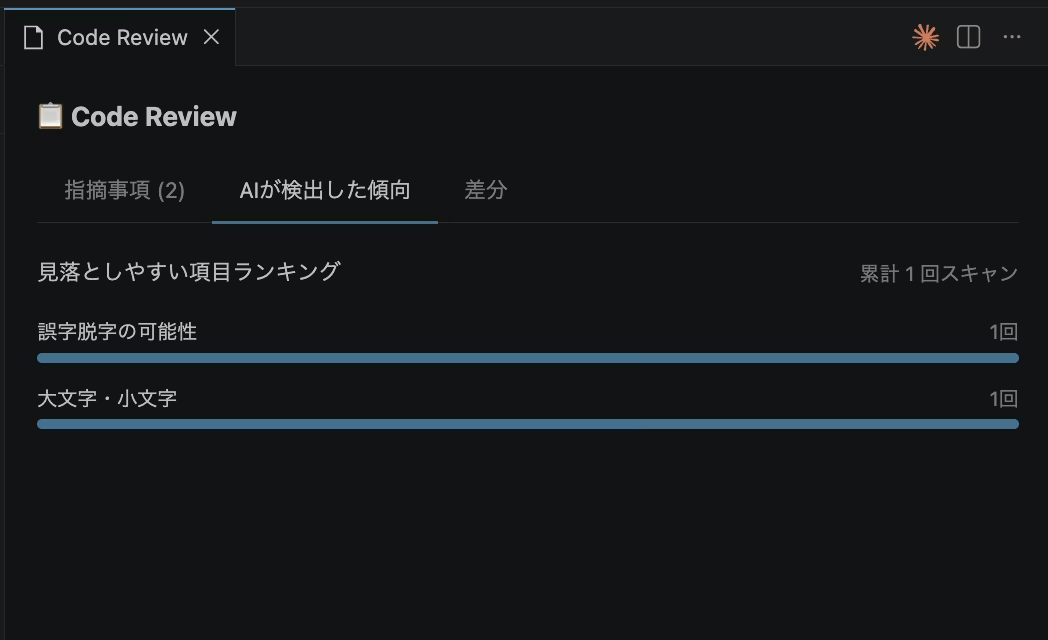
The patterns the AI detects are stored and accumulated, making it easy to see which mistakes you tend to make.
Here's what the prompt looks like.
チェック観点:
- テキスト内の不自然なスペース(全角・半角スペースの混入など)
- 大文字・小文字の不統一(クラス名・テキストなど)
- 誤字脱字の可能性がある箇所
- 括弧・記号の全角・半角混在(例: ()・() のように開き括弧と閉じ括弧で全角半角が混ざっている、テキスト中に全角の()[]{}が使われているなど)
- <a> の href属性が "#" のままになっている(未設定・仮置きの可能性)
- HTMLのネスト構造の意味的な違反(以下は特に重点チェック):
  - <ul>・<ol> の直下に <li> 以外の要素(<div>など)が入っている
  - <h1>〜<h6> の中に <div>・<p>・<section> などブロック要素が入っている
  - <p> の中に <div>・<ul>・<table>・<h1>〜<h6> などブロック要素が入っている
  - <a> の中に <a> がネストしている
  - <button> の中に <button>・<a>・<input> などインタラクティブ要素が入っている
  - <tr> の中に <td>・<th> 以外の要素が入っている
By adding to this over time and updating the extension, it can focus its checks on your personal mistake patterns, and its performance keeps improving!
Technical Details & Implementation
This extension is built using only TypeScript, the standard VSCode API, and Node.js built-in features, with no external libraries at all. The structure is simple, with just five main .ts files.
The standard VSCode API includes vscode.lm (Language Model API), which lets you call GitHub Copilot's models directly. With it, you can implement AI review without an API key from Anthropic or OpenAI. However, it's a relatively new API with little official documentation, so researching the specification alone would normally take a long time.
By asking Claude Code, "How can I call Copilot's models from a VSCode extension?" as I worked through the implementation, I was able to pick up specifics on the spot, such as how to use vscode.lm.selectChatModels() and how to receive streamed responses (for await (const chunk of response.text)).
Similarly, we were able to significantly reduce the time spent digging through documentation by working through bidirectional communication in WebviewPanel (sending and receiving messages between the Webview and Node.js) and persistent storage using context.globalState, checking with Claude Code along the way.
Summary
This time, I shared the story of building a VSCode extension to catch careless mistakes by finding them all in one go before committing.
By combining git diff with Copilot, you can reduce oversights and gradually add more review points to build a personal tool tailored to your own tendencies of mistakes.
I discovered that VSCode extensions are surprisingly easy to build using the standard VSCode API. Without Claude Code, I would never have thought to try making an extension! (lol)
Understanding the code and how it works is certainly important, but even if you leave everything to AI, simply saying "let's just build it!" and getting your hands moving often leads to ideas and discoveries.



I work mainly on markup and frontend development using JavaScript, React, and Next.js. I'm always happy when a site I've been involved in launches successfully! My hobbies are playing the guitar. I love cats and roasted sweet potatoes 🐱🍠
Hirocchi
Frontend Engineer / Joined in 2022