

We implemented it on our own website, which is built with an Astro SSG and a headless CMS.
The setup itself was fairly straightforward, but since our site is multilingual, we ran into a few pitfalls.
What Is Cloudflare AI Search?
It was formerly known as AutoRAG and was renamed in September 2025. Many search results still point to articles that use the old name and old API, so be careful.
It handles the following pipeline:
Crawling → Markdown conversion → Chunking → Embedding → Building a vector and keyword index
The API has two types of endpoints. search returns a list of search results, while chat/completions generates answers using RAG. This article only covers the former.
Key Configuration Points
Create the instance as follows.
- Select WebCrawl as the data source
- Public URL as the crawl target
- Parsing type: Sitemap
- Specify the main element as the content selector
- Parsing mode: Static site
- Specify sitemap.xml as the specific sitemap
- Set the embedding model to
@cf/baai/bge-m3(since the site is in Japanese)
Everything else can stay at the defaults.
Authentication and environment variables
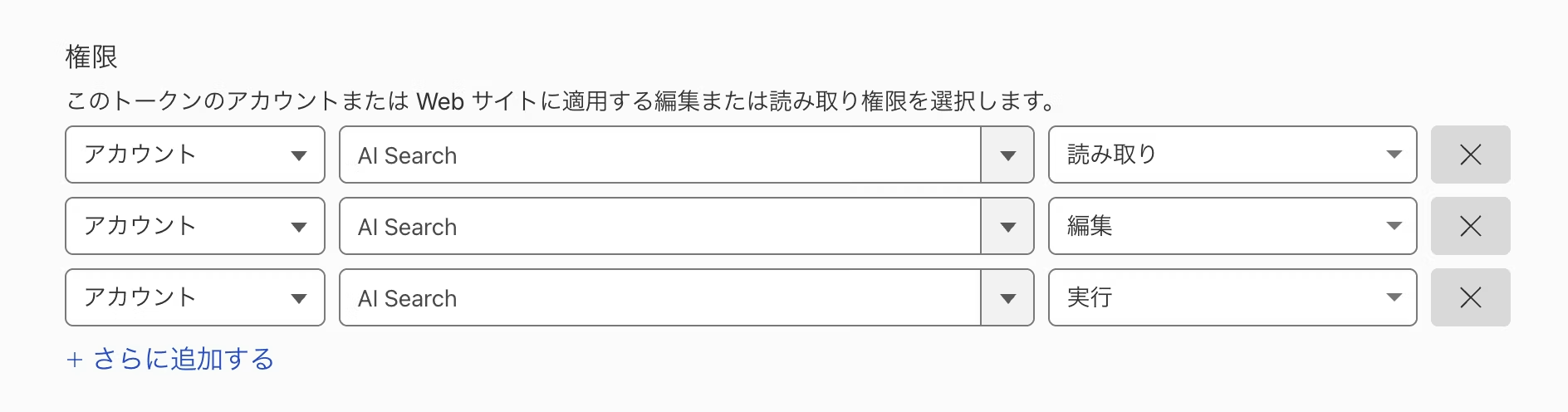
Create an API token from your account.
Note that you need not only "AI Search: Read" but also "Edit" and "Run".
Load the created token using the environment variable AI_SEARCH_TOKEN.
Structure: one API route + one component
Search calls the REST API from an Astro API route (running as a Pages Function). Since the API token can't be exposed to the browser, proxying through the server side is essential. Also, Pages Functions has no AI Search binding, so I used plain fetch instead of an SDK.
// Astro の API ルート(Pages Functions として動く)
const res = await fetch(
  `https://api.cloudflare.com/client/v4/accounts/${id}/ai-search/instances/${name}/search`,
  {
    method: 'POST',
    headers: { Authorization: `Bearer ${token}` },
    body: JSON.stringify({
      query,
      ai_search_options: {
        retrieval: {
          retrieval_type: 'hybrid',
          max_num_results: 50
        },
      },
    }),
  }
);
The implementation consisted of just two files: an API route and a search UI component. As an add-on to an SSG site, it turned out to be quite lightweight.
On multilingual sites, limit search targets to the displayed language
For a regular on-site search, this approach works fine. However, with multiple languages, the search reads a sitemap.xml that includes all languages, so results from other languages get mixed in.
The solution is to define a custom metadata field locale and narrow results at search time using filters. This way, only results in the language being viewed are returned.
Note: this can't be determined from the html lang attribute or og:locale, so be careful.
<meta name="locale" content="ja_JP">
Separate the SEO sitemap from the search sitemap
AI Search (Website data source) crawls via the sitemap.
However, our public sitemap intentionally excluded some languages based on SEO decisions. As a result, search for those languages always returned 0 results.
Since the sitemap is generated with @astrojs/sitemap, I took the approach of separately outputting a sitemap that includes all languages for search purposes.
How search results are ranked
It's quite different from what the term "AI Search" might suggest.
AI Search splits Japanese content into chunks of roughly 300 to 450 characters.
Up to 50 relevant chunks are picked up, and the pages containing them appear in the results.
Pages containing chunks judged to be highly relevant rank higher. Multiple chunks may be selected from a single page, so the number of search results will be fewer than 50.
Aggregation from chunks to page units is handled on the frontend. Also, a generative AI model is never run at any point in this entire process.
Summary
To use it, the domain's zone must be on Cloudflare and the site must be operated with Pages or Workers. However, the implementation is simple, and I think it would be quite useful if you want to add basic on-site search.
Conversely, if you want to add search without touching your infrastructure, need to list all items, or require admin features for operators such as search log analysis, suggestions, and synonym dictionaries, a traditional ASP is the stronger choice.
That said, an ASP is heavy to introduce, yet you still want search. For sites of that scale, I think this is a very compelling option.




Starting out in DTP and moving into the web, he now handles markup, frontend, direction, and accessibility alike. A "master of all trades" who has been versatile since Liberogic's early days and is now a walking encyclopedia of the company. Lately he has been hooked on exploring efficiency through prompts, asking, "Can't we rely more on AI for accessibility work?" Both his skills and his thinking are still evolving.
Ayumu Futamata
IAAP Certified Web Accessibility Specialist (WAS) / Markup Engineer / Frontend Engineer / Web Director