

Hello! I'm Hashi, a UI designer at Liberogic Inc.
Be honest, do you have a secret struggle like this? You installed a habit app with the determination of "Alright, starting today!" and yet the habit app just won't stick.
I'm a pro at starting things, but I've never managed to keep them going.
There are plenty of excellent, beautiful apps out there.
At first, I log everything diligently every day. But then work gets busy or there's a drinking party, and one day the "streak" breaks, and my motivation drops to zero in an instant...
Even the reminder notifications I once cared so much about soon turn into background noise, and the apps sit fossilizing at the edge of my phone screen.
That sense of defeat that hits you in the moment, thinking "Oh well, never mind." I'm sure I'm not the only one who has felt it.

Is there no one who will lend a hand to someone whose life is full of giving up after three days? (No one, it seems...
What really tormented me further was the "scattering of apps."
Switching between separate apps for each item, such as a habit tracker, a medication calendar, and a household account book, only added to the hassle. On top of that, there were so many paid subscriptions that I had gotten sloppy with managing them and ended up forgetting to cancel. This was completely backwards.
That's when a designer's self-indulgent idea exploded. "Then why don't I just build my own app, packed with only the features I need, just for me?"
And so began the development of the "Ore-Ore Habit Cockpit," a app tailored entirely to my life, built hand in hand with AI (Claude Code)!

Surely AI would show me the optimal solution, for now.
1. [Feature Overview] A signature feature that systematizes "slacking off" to wrap around my own laziness with the system
Now, let me introduce the features I actually implemented.
Taking the best parts of existing apps, I aimed for the ultimate "dashboard" tailored to my life.
To consolidate the apps I needed into one, I first started building a habit-forming app.
Since I wanted to use it differently in the morning and at night, I've prepared both light mode and dark mode.
🌱 Initial Screen
The initial screen displays an input form for the habits you want to build, so you can proceed by entering them yourself.
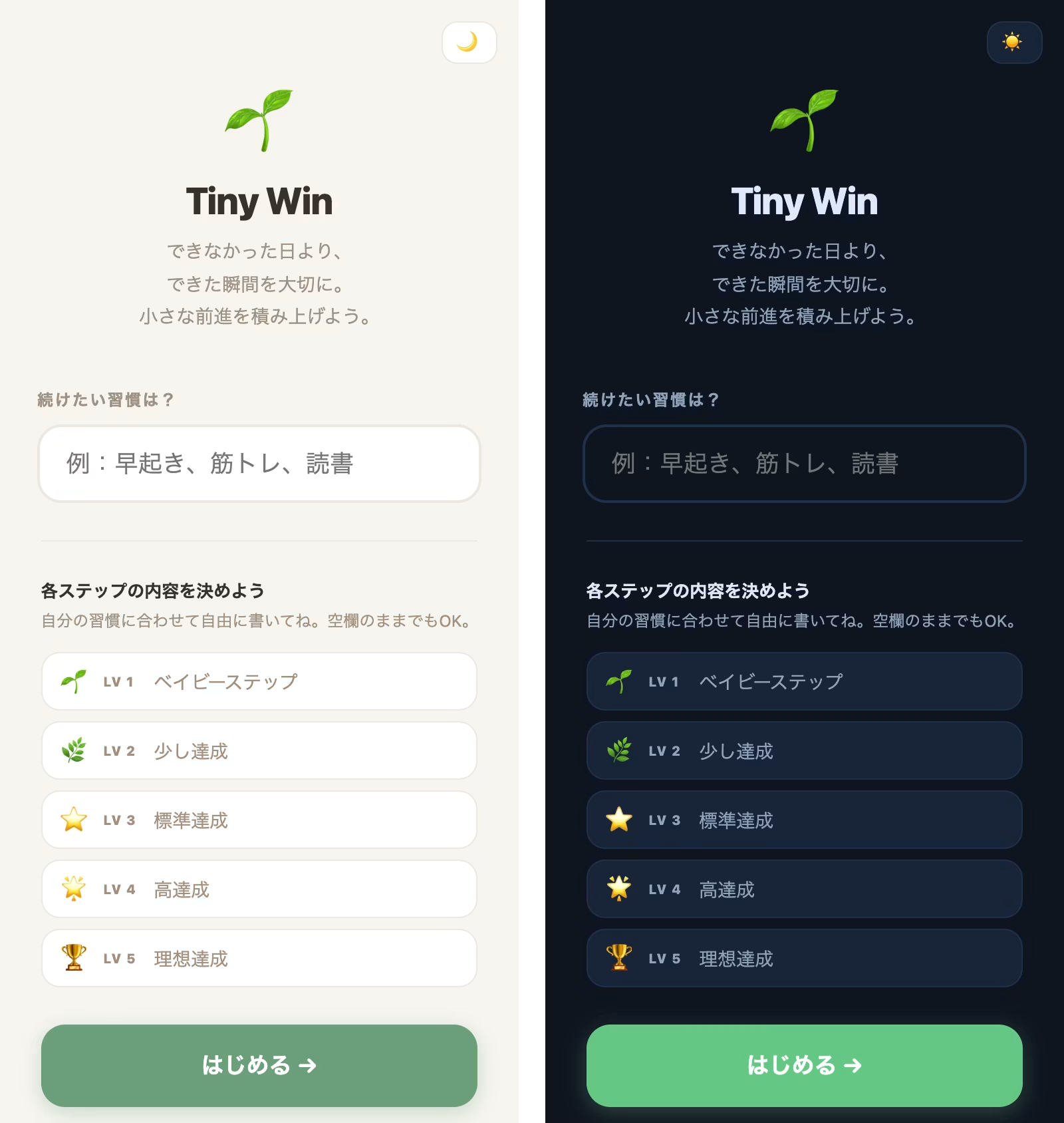
Scroll down and you'll find a link to "Answer questions to build a habit." Click it, and the app will answer a series of questions and suggest habits tailored to you.
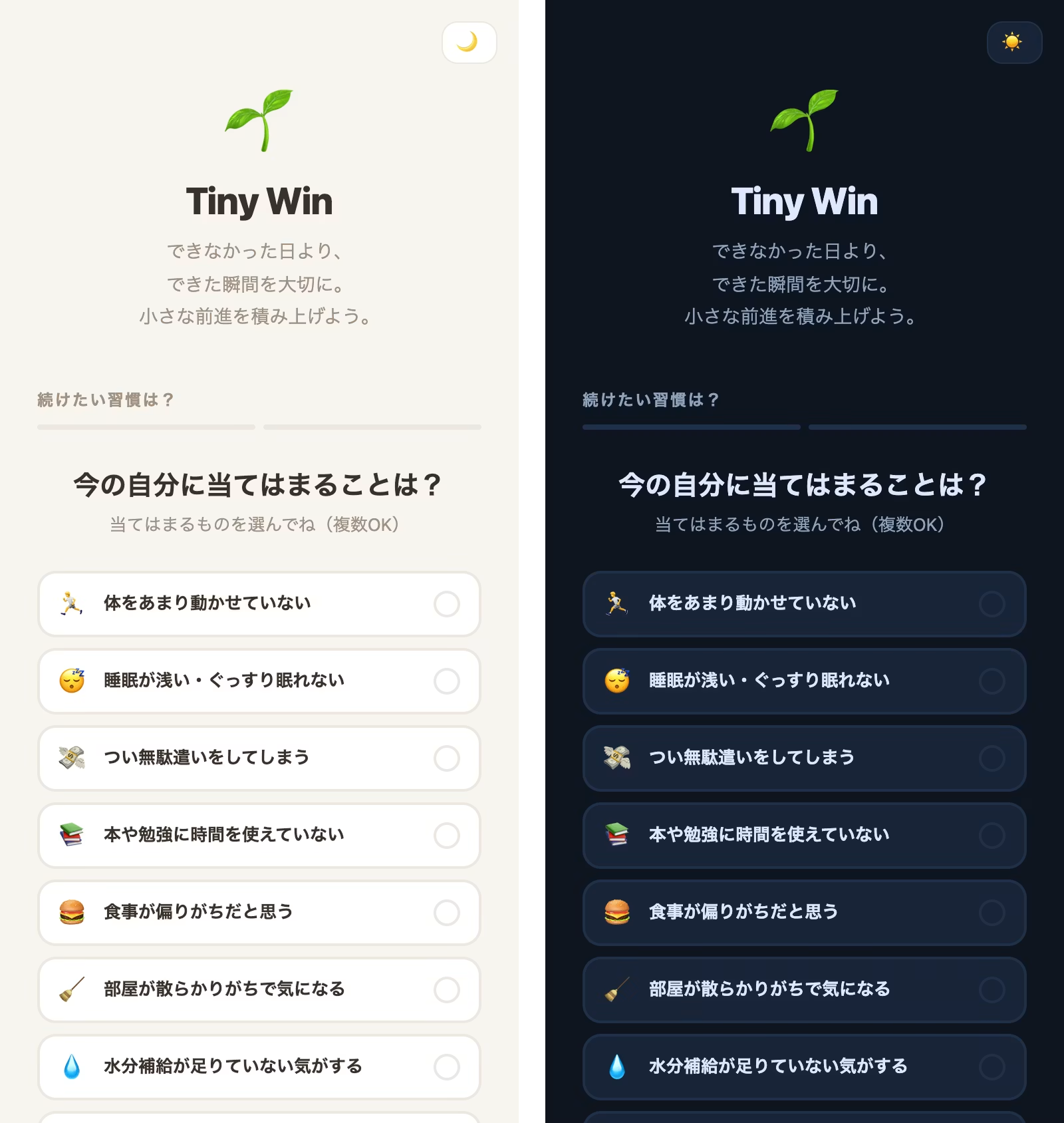
The initial screen introduces a habit diagnosis feature.
I also built a habit navigation feature on the initial screen for users who aren't sure what habits they want to build. By simply answering a few questions, they can choose habits that suit them.
🌱 Habit Tracker: Moving Beyond the All-or-Nothing Mindset
To build a habit, it helps to start with small steps and keep going steadily, even if the progress is minimal.
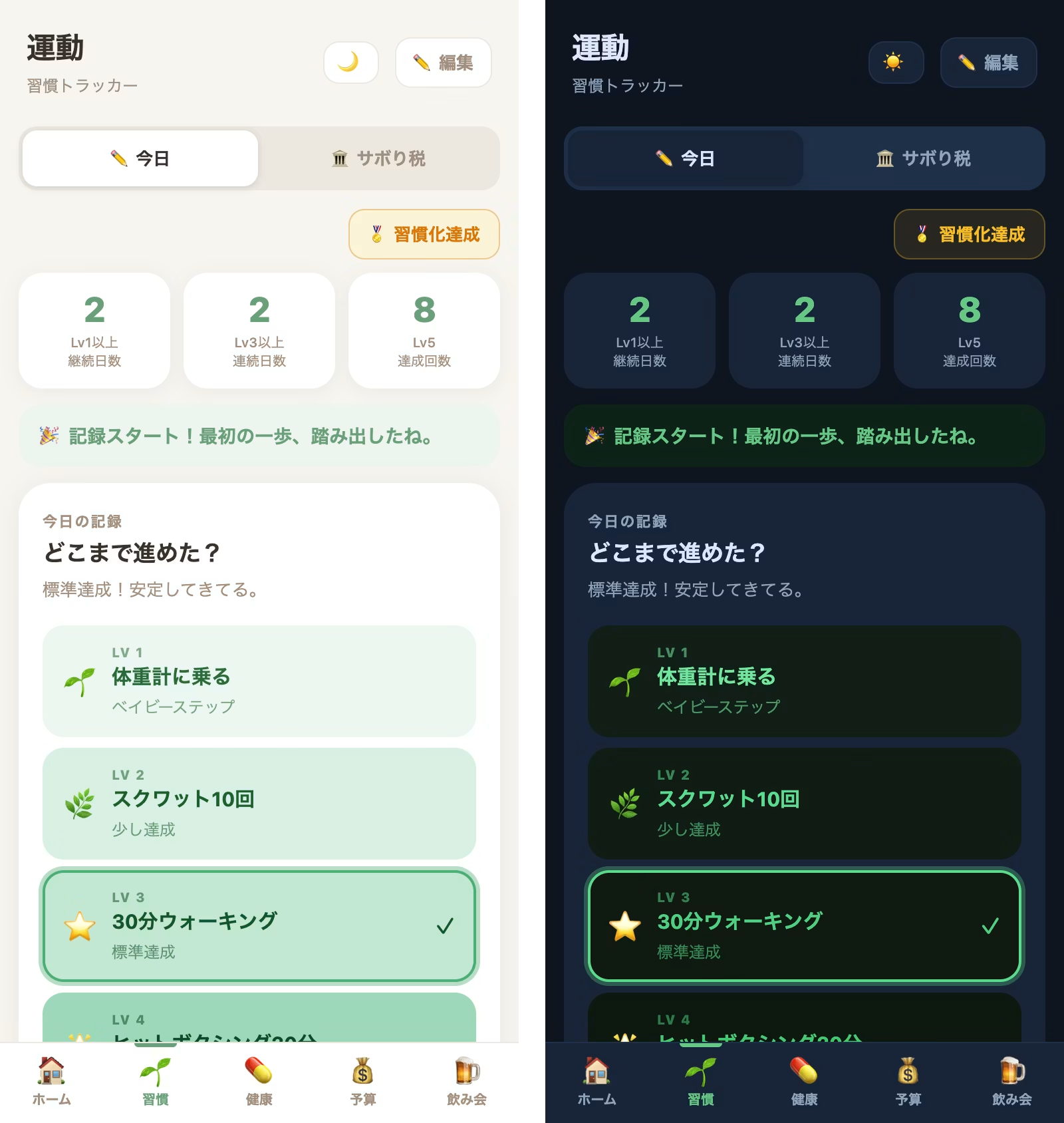
I created a habit-building app with a "5-level rating" feature. Most apps I've used before only offer a two-option choice: "done" or "not done." In this app, however, days you "did it perfectly" and days you "made a small effort" (Lv1) both show up in color on the calendar.
For example, for exercise, you can log effort at each level: from "Lv1: Step on the scale" and "Lv2: Do squats when you use the bathroom" to "Lv5: Swim 1 km in the pool and do 40 minutes of hit boxing." You can record whatever effort you made on a given day.
Days you skip will appear blank, but with the "slacker tax" system I'll explain later, you can make up for missed days on other days. So even if you skip a day, it won't feel discouraging.
Just start again the next day. This low-pressure approach means I can at least step on the scale every day!
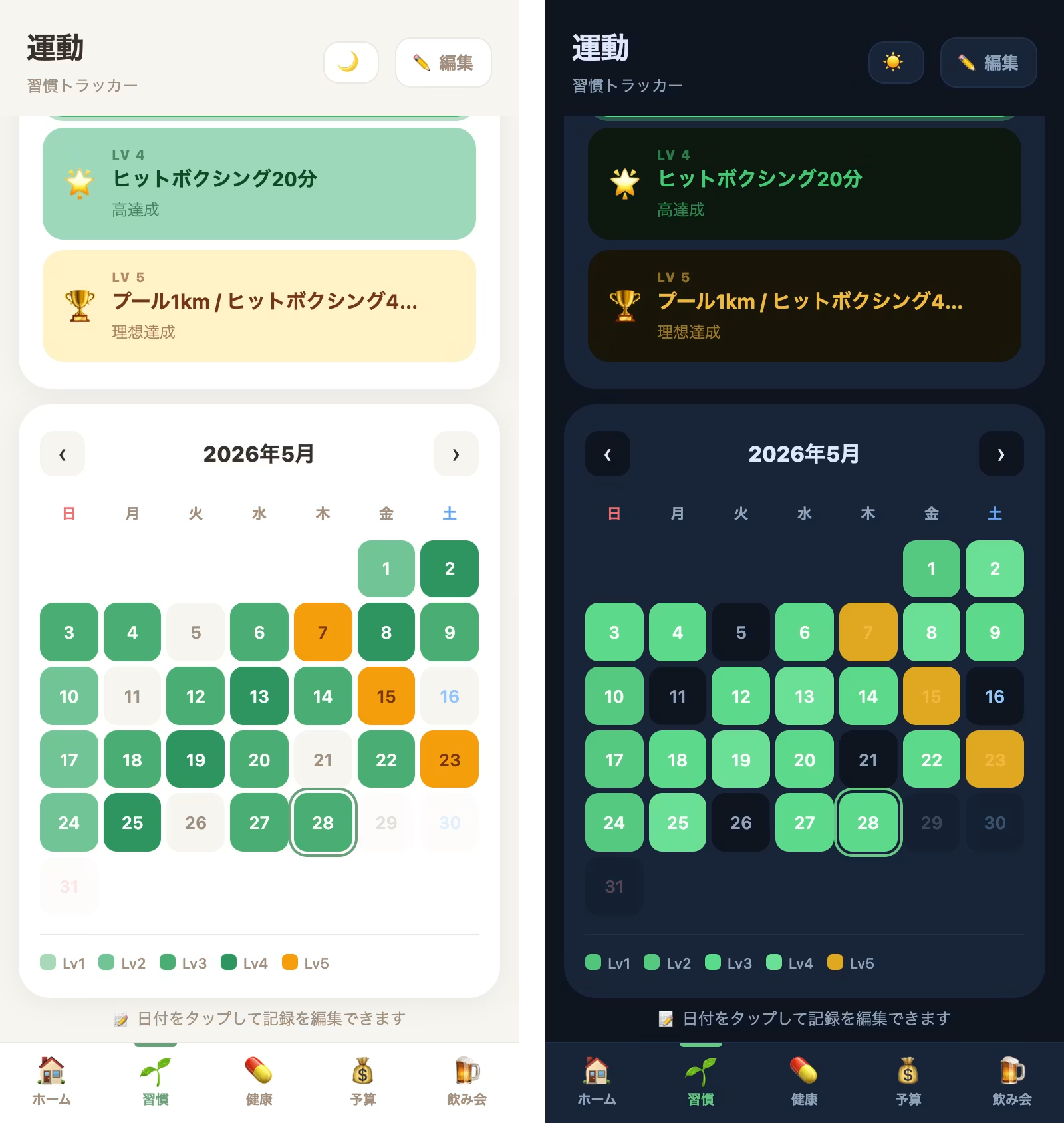
The calendar gradually fills with shades of green, so you can enjoy visually building up a "stack of colors." Looking at the monthly view makes it easy to see how much you've accomplished, which also keeps motivation high.
Visualize progress with the calendar feature
The calendar UI changes color whenever you complete a habit. The color intensity and hue vary by level, letting you see how consistently you've followed through on your habits, which helps you stay motivated.
Habit archiving and new habit creation included
Once a habit has become second nature after a certain period, you may want to move on to something new. That's why we've included habit archiving and new habit creation! Click the "Habit Achieved" button to add a new habit.
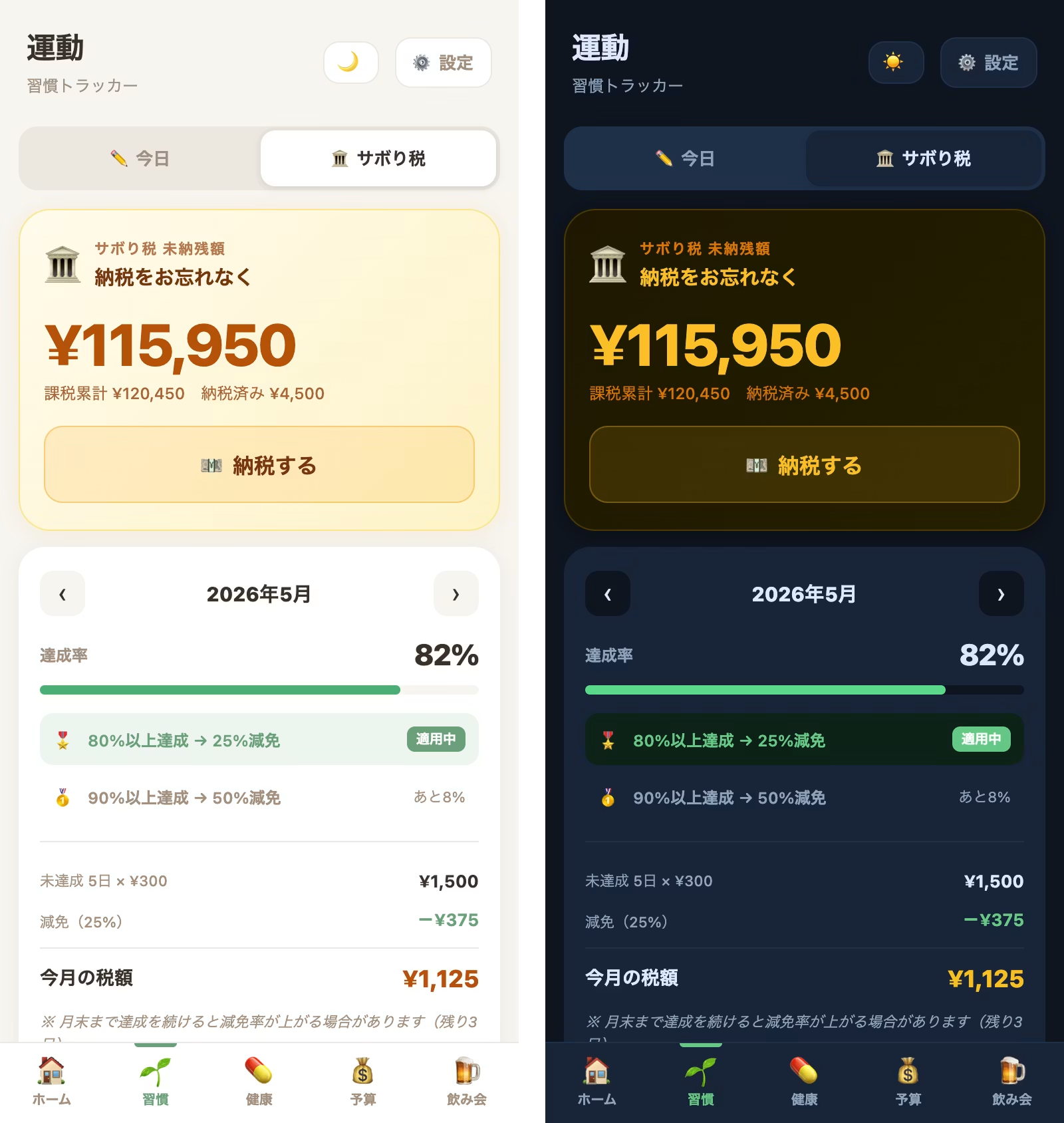
🏛️ Slacker Tax: Turn Guilt into Savings
This is another feature linked to the habit tracker above!
On days you skip a habit, a "tax" (default: 300 yen) is charged to yourself.
Everyone has times when they just can't keep going.
So a penalty is necessary to keep myself disciplined, but a simple fine would just make me hate the app.
Do you know why people get fat? They take the easy, lazy route and rely on food to fill them with dopamine, a quick and cheap source of happiness hormones. So no matter how harsh the penalty, it's pointless for someone like me who struggles to build habits.
I thought about something like donating the amount I skipped to charity, but I was confident that if I squeezed myself that tightly, I would never open the app again (lol).
For the payment destination of the slacker tax, I chose "depositing it into my own index fund investment account".
In other words, it's a fine, but not really a fine. It's a fine for my own benefit.
I made it so that even the guilt of slacking off turns into asset investment for my future self.
What I was particular about was a "tax reduction system" based on the monthly achievement rate.
- "50% tax exemption for an achievement rate of 90% or higher"
- "25% tax exemption for an achievement rate of 80% or higher"
I've built in a mechanism that works like this.
The screen shows "Only 1% more to get a 25% tax reduction!", and seeing that somehow gives me a strange motivation: "Even if today is just Lv2, let's do our best."
The biggest enemy of building a habit is the moment you skip a day, your streak breaks, and you feel like giving up on everything.
But thanks to this tax reduction system, you can pull yourself back with "I skipped a day, but there's still a chance for a tax reduction!"
A gentle design thoroughly tailored to lazy people like me, one that doesn't let a single failure make you give up.
✨ Skincare Tracker & 💊 Medication Management: No more app-hopping
✨ The skincare check tool I always wanted
Habits, medications, household budgeting... Managing these in separate apps was the ultimate hassle for lazy people like me. To eliminate this "app-hopping," we've fully integrated your daily skincare and health management into this single cockpit.
Since I could reuse the features from the habit-tracking app as they were, the implementation was straightforward.
🧴 A "Skincare Tracker" that accepts days when you can't keep up
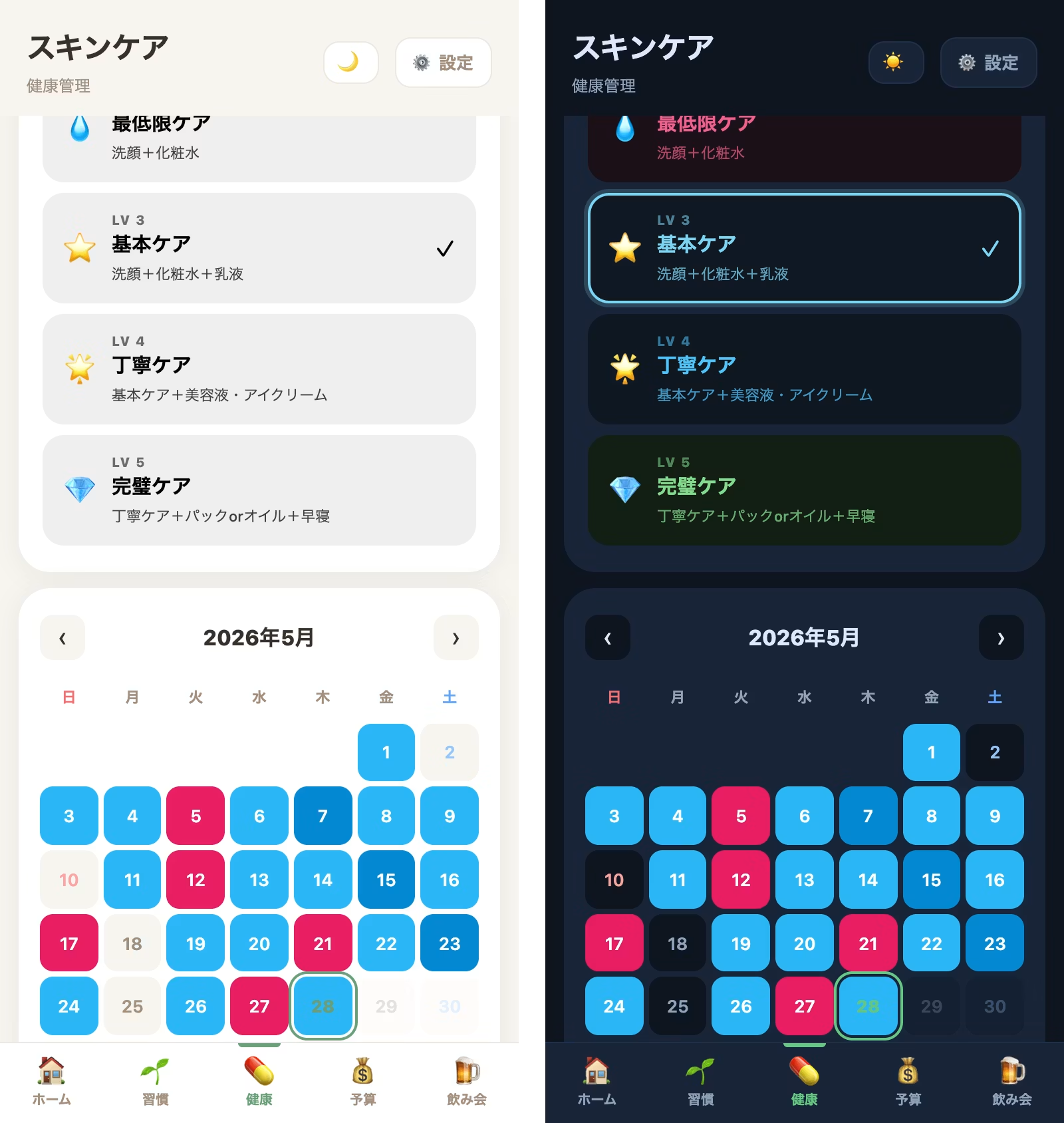
Skincare is a habit worth building, too. When you open the screen, it asks, "How far did you get?" and walks you through five steps.
On days when you come home completely exhausted, Lv1 (Face wash only: wash with water or a facial cleanser) is perfectly fine. If you have a bit more energy, you can log Lv2 (Minimum care: facial cleanser + lotion), Lv3 (Basic care: + emulsion), or, on special days, Lv4 (Thorough care: including serum). You can record it based on how your skin feels that day.
You can also customize the name and care details (descriptions) of each level from the "Step Settings." At the top of the screen, your "Average Lv for this month" and "Consecutive days at Lv3 or above" are visualized, so you can stay motivated at a comfortable pace, such as thinking, "I've only been doing Lv1 because I've been tired lately, so today I'll aim for Lv3."
💊 Medication Management That Fully Supports Low-Effort Routines
Personally, medication management is what I find most likely to fall apart.
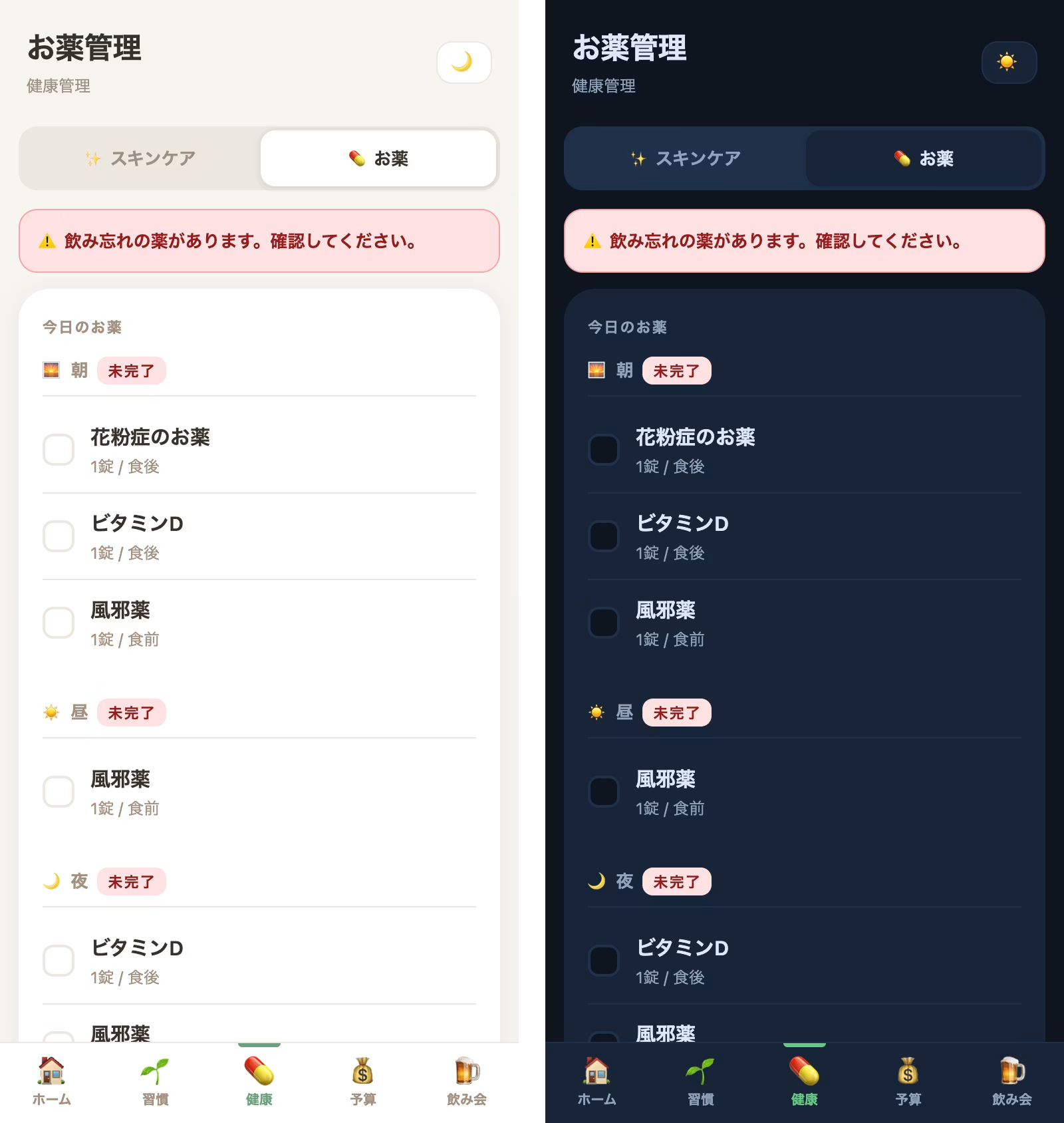
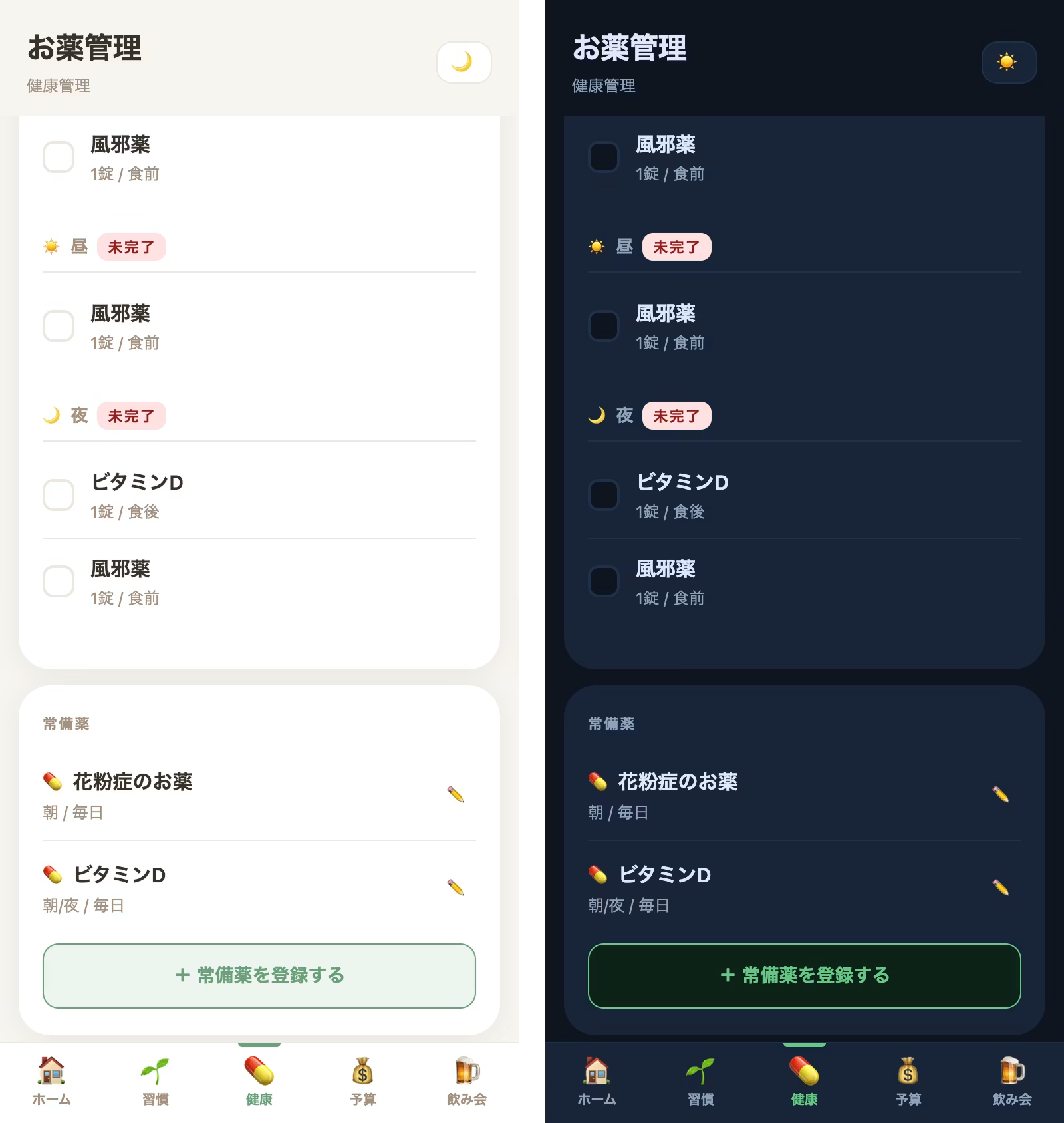
This app goes beyond simply entering a medication name. You can register medications in fairly fine detail and with flexibility, including timing (morning, noon, night), instructions such as "before meals," "after meals," or "as needed," the number of tablets for each timing, and even complex schedules like "daily," "every other day," or "specific days of the week."
When there are medications not yet taken, a prominent red alert appears at the top of the screen saying "⚠️ You have missed medications. Please check." It gives you a nudge to get back on track.
At the bottom of the screen, you'll also see realistic numbers such as "Medication adherence rate this month" and "Number of missed doses." (On the test screen during development, my adherence rate was 5%, so I'm clearly showing my low-effort side... haha.)
But don't worry.
Even if you forget to take your medication on some days, the "log later" design, which lets you backfill records from the calendar, is still here, so you can keep going at your own pace without falling into perfectionism.
As we get older, we take more medications, so this feature is really handy. It's also very helpful that I can share information about past medications when I see a doctor (since I'm the type who always forgets their medication notebook).
🍺 Drinking Session Tracker: A seriously motivating feature for better health and savings
And honestly, the feature that has changed my life the most is this drinking session tracker.
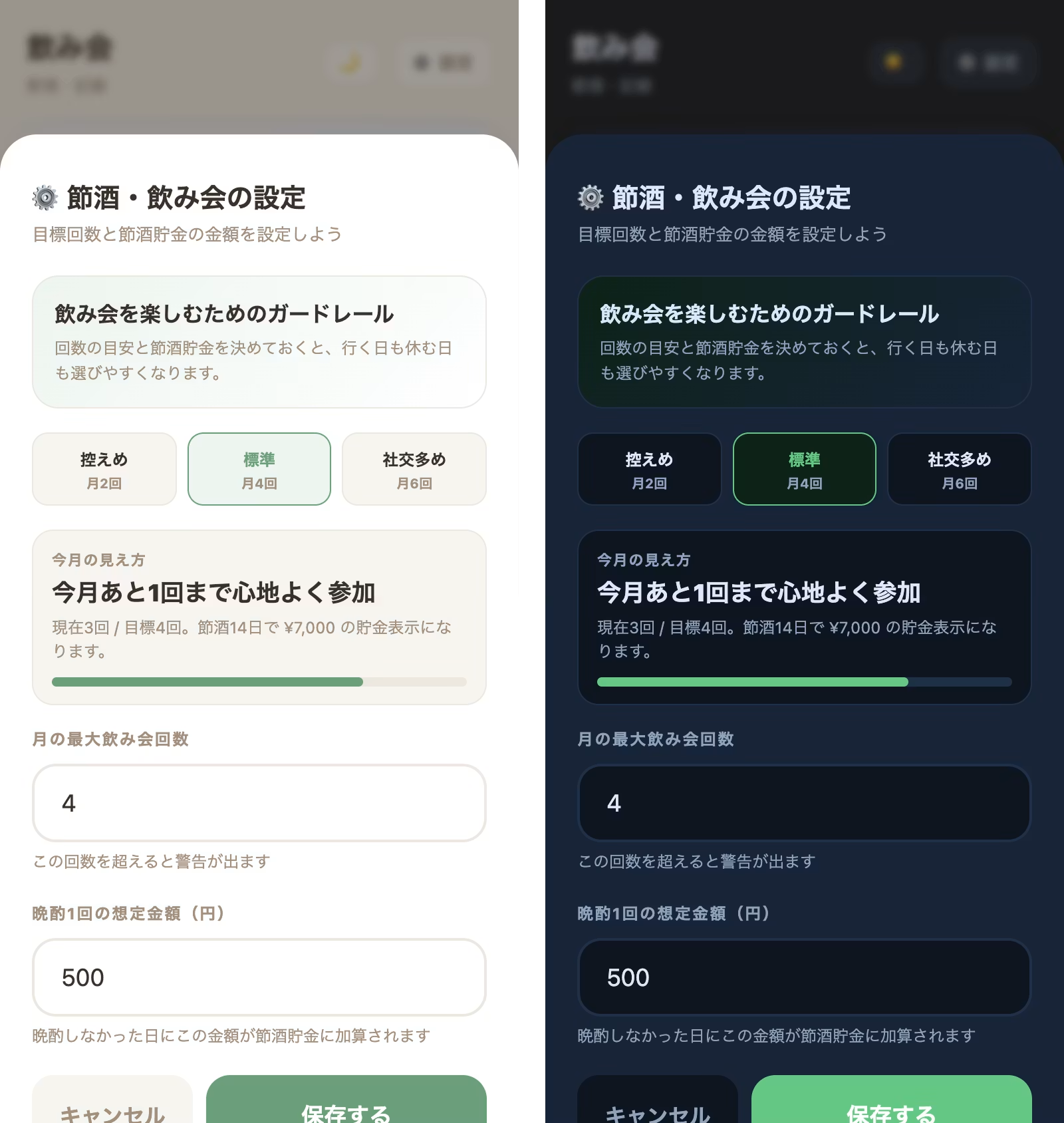
It does more than log what you drank. It helps you manage a monthly limit on drinking sessions (for example, "up to 4 times a month") and a budget, while turning those small moments of restraint into visual rewards.
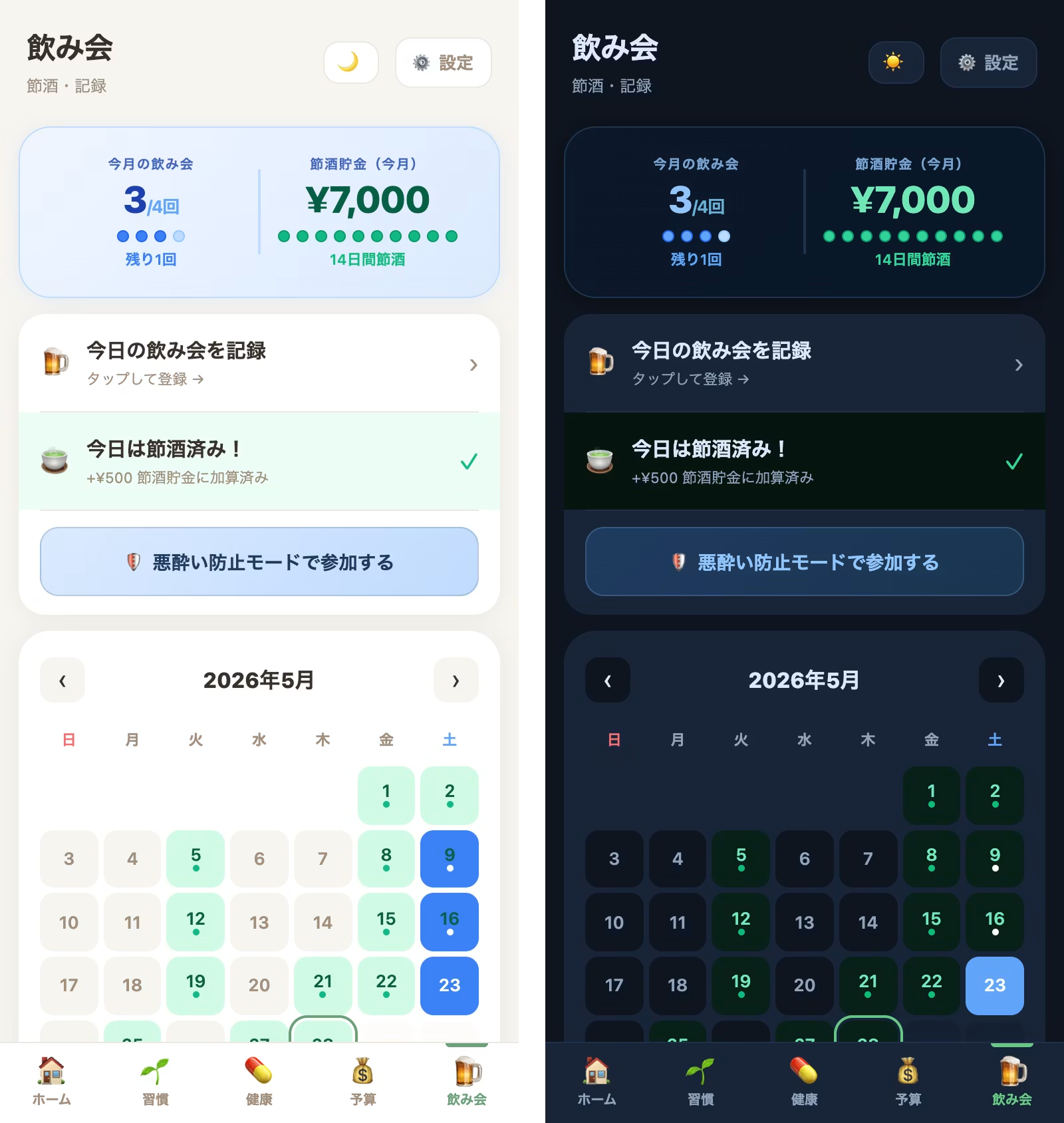
🍵 One tap, cha-ching! The "Sober Savings" fund
In your everyday life,
"I'll skip drinking at home today,"
and on days you manage to hold off, just tap the "No drinking today" toggle on the home screen.
That's all it takes. A green mark appears on your calendar, and ¥500 is added to your "Sober Savings" with a satisfying cha-ching.
Your everyday restraint adds up in real money, so as the month-end approaches, you get a rush of satisfaction and dopamine: "I've already saved ¥3,000 (6 days) this month!"
Put that saved money into investments or savings.
If you feel the benefits of cutting back or quitting drinking, such as using the money you saved from things you wanted to buy, your motivation to keep going will likely grow stronger.
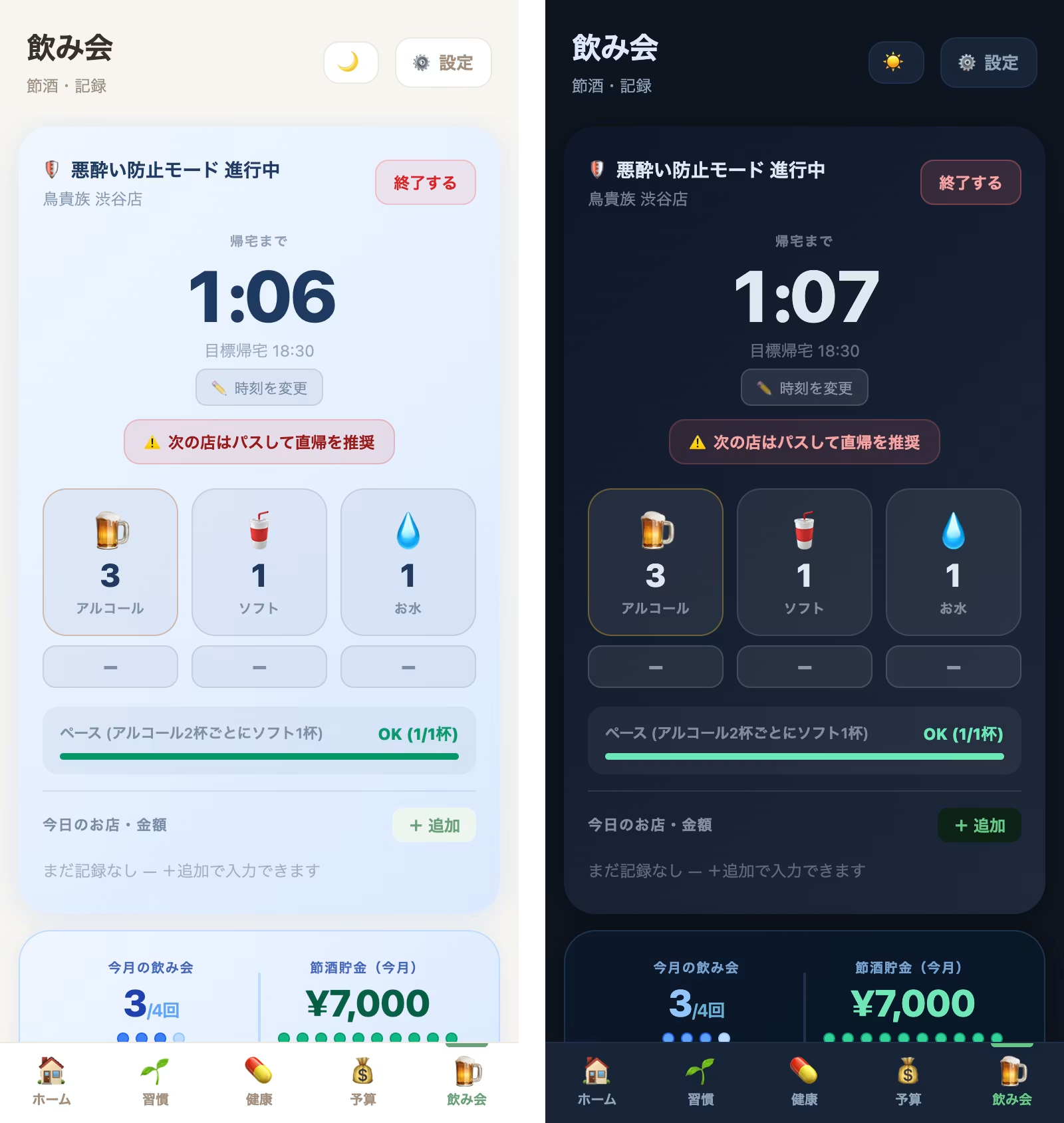
🛡️ "Drink-Responsibly" Mode to Keep You in Check at Parties
The app's secret weapon is the "Drink-Responsibly Mode." Once a party starts, simply turn on this mode, and a countdown to your target home time appears right in the center of the screen. Of course, when you're having so much fun that you think, "Just a little longer!" you can easily extend your time with the "Change Home Time" or "🎉 Room for a Second Round!" buttons. It's designed to be kind to the lazy side of you.
The screen also features counters for drinks: "🍺 Alcohol," "🥤 Soft Drinks," and "💧 Water." The app analyzes your pacing in real time, such as "one soft drink for every two alcoholic drinks," and the gauge shows "OK" in green to let you know you're on track. This significantly reduces the hangover the next day and those regrets of "Why did I drink so much...?"
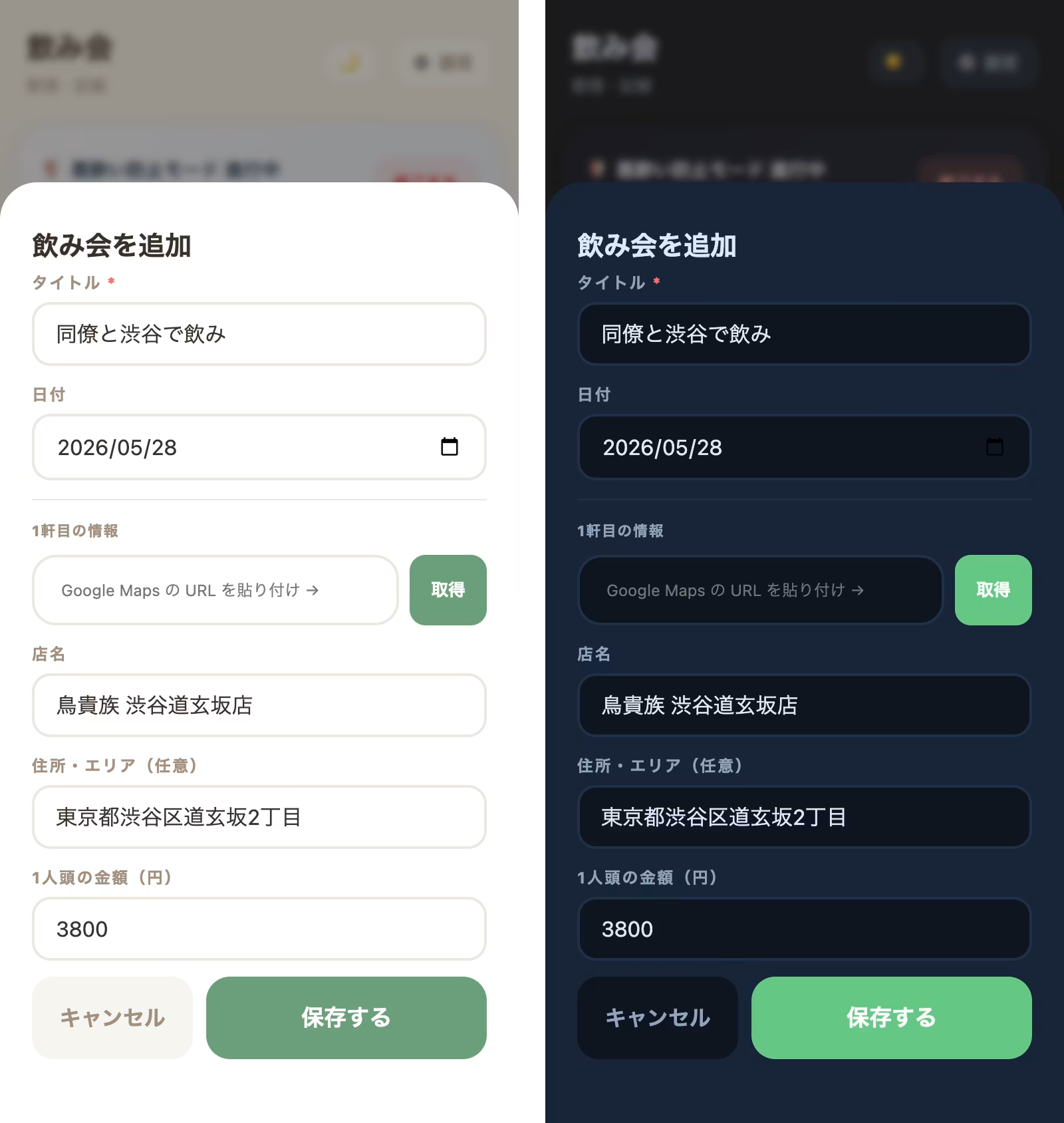
📊 Many More Useful Features for Parties
After a party, you can record details such as the name of the restaurant, like "Torikizoku Shibuya," the amount actually paid, and notes about who you went with. We also added a feature that automatically fills in this information when you enter a Google Maps URL. Since this only requires a few uses per month, I was told by AI that using API integration would not cost anything, so I implemented it.
I sometimes forget to settle up after parties, so I added this feature as a memo for that.
It's great because there's no more confusion over who paid and who didn't.
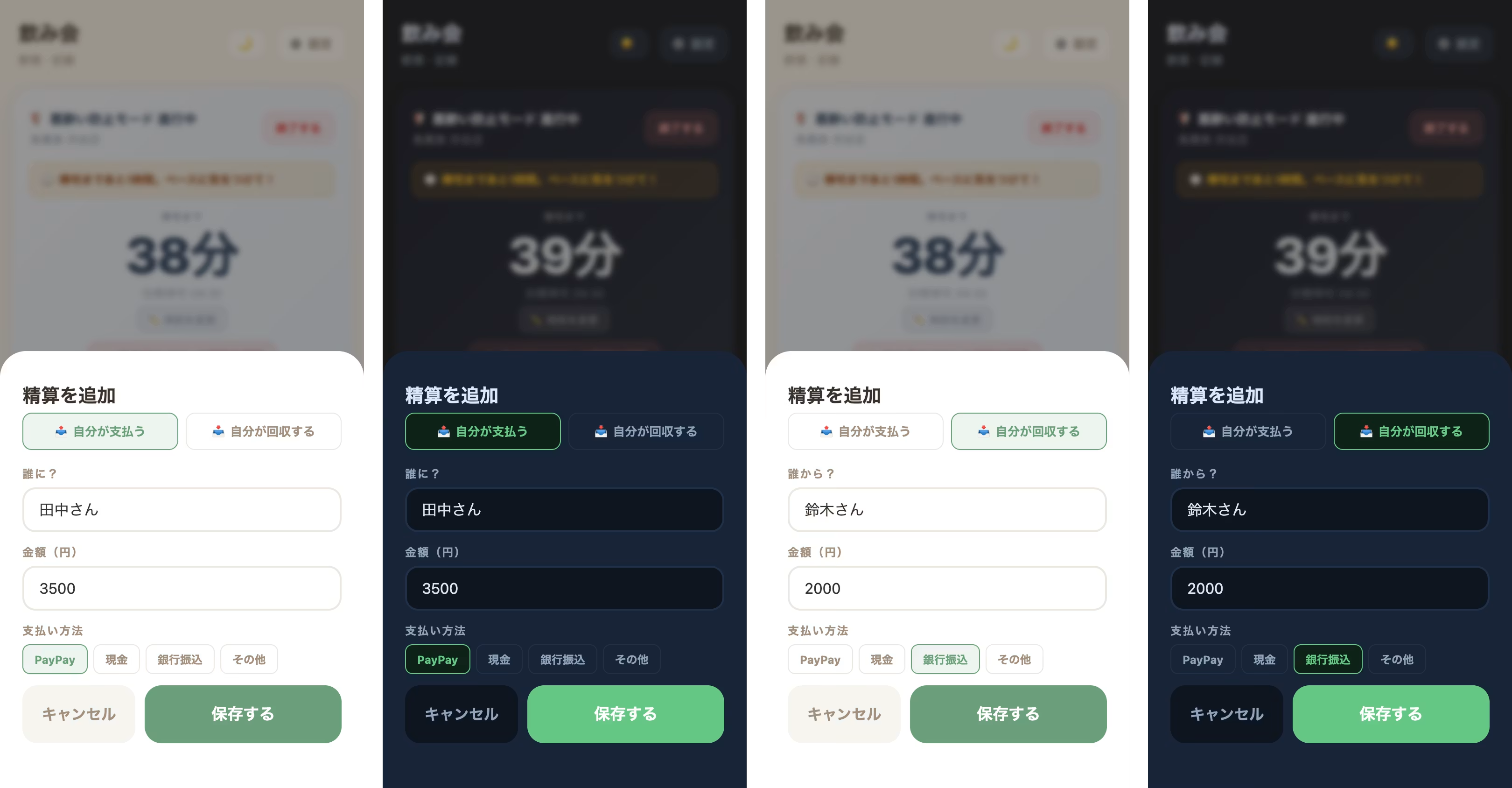
Then, at the end of each month, the "Monthly Report" combines your "Drink-Saving Fund" (based on the number of days you skipped evening drinks) with the difference between your party budget and what you actually spent, which is shown as your "Total Savings" in a proudly displayed way. For example, when you see at a glance that you saved 9,000 yen this month, you'll feel excited about buying that gadget you've been wanting. It's a favorite feature that helps you gain both health and money.
2. After Development: Claude Turned Out to Be a Designer's Best "Translator"
So, with all my laziness and selfishness poured into this app, it finally took shape. But a complete beginner like me could only get this far thanks entirely to my partner, Claude.
I can already hear engineers asking, "Are you out of your mind?" I went with an extremely brute-force approach: packing HTML, CSS, and JavaScript all into a single index.html file. But for the two of us (me and Claude), this turned out to be the perfect choice.
When code is split across multiple files, just telling Claude "fix this part in that file" becomes a hassle. With one file, though, I can paste the entire code into the chat and Claude grasps everything instantly.
Claude translates my vague ideas like "I want it to behave like this" into beautiful code. Sometimes a missing closing tag or the wrong JavaScript loading order crashed the entire app, and the two of us would chase error logs late into the night. Even those troubles felt like a buddy movie, and I had a lot of fun (lol).
Connecting to GitHub and Cloudflare was also quick. Just by chatting, Claude explained how to register the accounts and even pasted the official links directly, so the integrations were done in no time.
3. The Next Big Wall: Into the Depths of Design and Security
With Claude's help, I got the ultimate toy (app), with both the look and the movement exactly as I had imagined.
...But then a new problem arose.
As I used this cockpit every day, I suddenly came to my senses. "Wait, this app is stuffed with my real health status, daily medication records, recent household finances, and a log of my slacking. It's packed with exposed, raw privacy."
For now, I've locked the screen with a simple PIN code, just for peace of mind. But to be honest, I'm a complete amateur when it comes to security. With only my own knowledge and AI's help, I can't shake off a lingering unease about entrusting it with important data.
As designers who create a "pleasant experience," we know that the "absolutely no leaks, no breaches" sense of security behind the scenes is an essential part of it too.
"I want to use Face ID on my smartphone or the latest Passkeys so that only I can open it safely and smoothly!"
That's what I thought, but security is an extremely specialized field that doesn't go smoothly.
This is already beyond what I can handle...
I plan to talk with an engineer and proceed carefully from here.
I'd eventually like to introduce a household account book tool and add features that automatically record transactions just by uploading credit card usage history, but I'm concerned about security, so I'm putting that on hold for now.
Summary
The tools are ready. Next, I want to create "peace of mind"!
An idea I had only been mulling over in my head, thinking "I don't have the knowledge to develop it," has now become a tool that actually changes my daily life, thanks to AI, my best partner. I've stopped blaming myself for not being perfect. By paying a small "slacker tax," I can start over as many times as I need. Thanks to this gentle system, I, who used to give up after three days, now enjoy building habits every day.
But the more convenient things become, the more responsibility comes with protecting them.
Although not mentioned in this article, we are gradually adding features such as notifications and household account book management.
However, features like household budget tracking require careful handling from a security standpoint, so for now they are still being developed in the development environment.
So, stay tuned for the next update!



UI design is evolving every day! I'm also wrestling with how to bring accessibility into landing page design. I've recently stepped away from markup, and lately I've been wondering, "Should I be evolving my JS skills too?" Oh, and I'm a big fan of Takumi Kitamura!
Hasshi
Web Designer / Joined in 2018 / Still a budding designer at heart