

About half a year ago, Next.js 16 was officially released on October 21, 2025.
The concept of Cache Components itself was introduced in Next.js 16, and caching can now be explicitly controlled.
Only the location where use cache directive is written gets cached, and component-level caching becomes possible using <Sunpense>.
Given the opportunity to write about this, I'll summarize how to use Next.js 16's "Cache Components" as a memo for future reference.
Four Caching Patterns in Next.js App Router
There are four caching patterns in Next.js App Router as follows.
- Request Memoization: De-duplication of the same requests. Even if the same fetch is called from different components, it executes only once. This is a feature Next.js handles automatically.
- Data Cache: controls cache implementation through fetch options.
- Full Route Cache: page-level cache that works with static rendering (SSG, ISR). A mechanism that caches RSC payloads and HTML on the server side.
- Router Cache: a mechanism that temporarily caches only RSC payloads in client memory. It works when you use the Next.js component.
Next.js 16's new feature "use cache"
What the new Cache Components feature enables.
- Simplify cache configuration using
use cache. Only the locations whereuse cacheis written are cached, allowing explicit cache control. - By wrapping with
<Suspense>, you can isolate components and enable cache specification at the component level.
In the traditional Next.js 15 and earlier, fetch was cached by default, making it unclear where caching occurred and prone to unexpected caching.
Since caching happened automatically by default, disabling it required adding fetch(URL, { cache: 'no-store' }).
In contrast, Next.js 16 changed the approach to explicitly specify use cache when caching is needed, resulting in a clearer, simpler method.
Previously, Next.js Data Cache could only be utilized via fetch, but now caching can be applied directly to asynchronous functions that don't use fetch, such as database queries.
Implementation method
You need to enable Cache Components in the next.config.js file.
With this configuration, Cache Components functionality becomes available!
import type { NextConfig } from "next";

const nextConfig: NextConfig = {
  cacheComponents: true,
};

export default nextConfig;
Add the use cache directive at the beginning of the component you want to cache. If you want to cache only a specific function, write it inside that function.
'use cache'

async function getPosts() {
  const res = await fetch('<https://api.example.com/posts>')
  return res.json()
}

export default async function PostList() {
  const posts = await getPosts()
  return (
    <ul>
      {posts.map(post => <li>{post.title}</li>)}
    </ul>
  )
}
What happens if you don't add use cache to the fetch function?
Starting with Next.js 16, you need to add use cache to enable caching, but what happens when you don't add either use cache or the cache option?
If you set cacheComponents: true, you will get an error. To intentionally disable caching, do not use fetch(url, { cache: 'no-store' }); instead, just wrap with <Suspense>! (If cacheComponents: false (default), you can use no-store as before)
Caching at the function level
Previously, caching could only be specified at the page level, but by using use cache and , you can now configure caching at the component and function level.
The benefit is that static and dynamic rendering can be mixed within a single page, enabling fast static delivery and dynamic content to coexist. This dramatically improves initial load speed and UX. (This rendering approach is called PPR.)
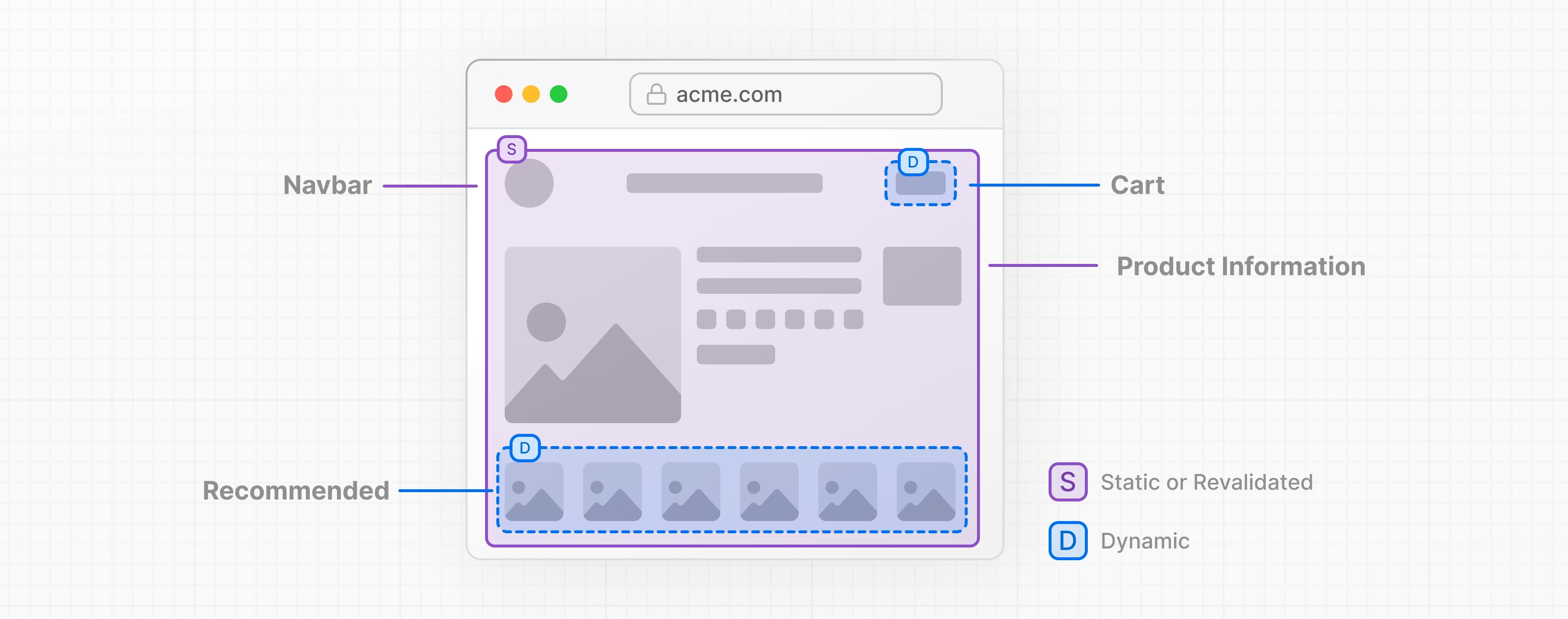
Suspense
The role of <Suspense> is to process separately and isolate from other parts of the page.
By wrapping with <Suspense>, you can isolate components, so if you want to cache at the component level, specify it within the wrapped component.
About rendering
The rendering method is determined by your cache settings.
"How do you want to display this page/data?" (such as update frequency)
↓
Decide on the rendering method (SSG / ISR / SSR / PPR / CSR)
↓
Configure the corresponding cache
This is the approach.
There are several rendering patterns, but we'll skip those for now!
For example,
a dynamic routing page that fetches data from microCMS and displays blog articles
↓
SSG or ISR is optimal for the rendering method (since article content isn't updated frequently)
↓
caching is optimal → add use cache
That's the kind of way you can implement it.
By the way, if you don't set Cache Components to true in the next.config.js file, you can use the fetch cache option as usual.
Summary
When thinking about cache settings, the important flow is asking "How do I want to display this data and page?" and then implementing with optimal performance for that specific page.
Once that answer is decided, whether to use use cache naturally becomes clear.
Many people tend to understand caching, rendering methods, and data fetching as separate concepts, but they're actually all connected!
It's important to think of them not as separate concepts, but as one continuous flow!




I focus on frontend development with markup, JavaScript, React, and Next.js. I'm always happy when a site I've worked on goes live successfully! My hobbies are playing guitar, and I love cats and roasted sweet potatoes 🐱🍠
Hiraicchi
Frontend Engineer / Joined 2022