

What is Cloudflare? Key Features, Capabilities, and Use Cases from a Web Development Agency Perspective
Cloudflare as a name has become quite well-known, but what it actually does is often understood only vaguely. Honestly, not long ago conversations would often end with "It's a CDN company, right?" and some people may have only learned about it due to last year's outage.
While many people probably understand it already, let me break down how companies like ours and our directors can actually leverage it.
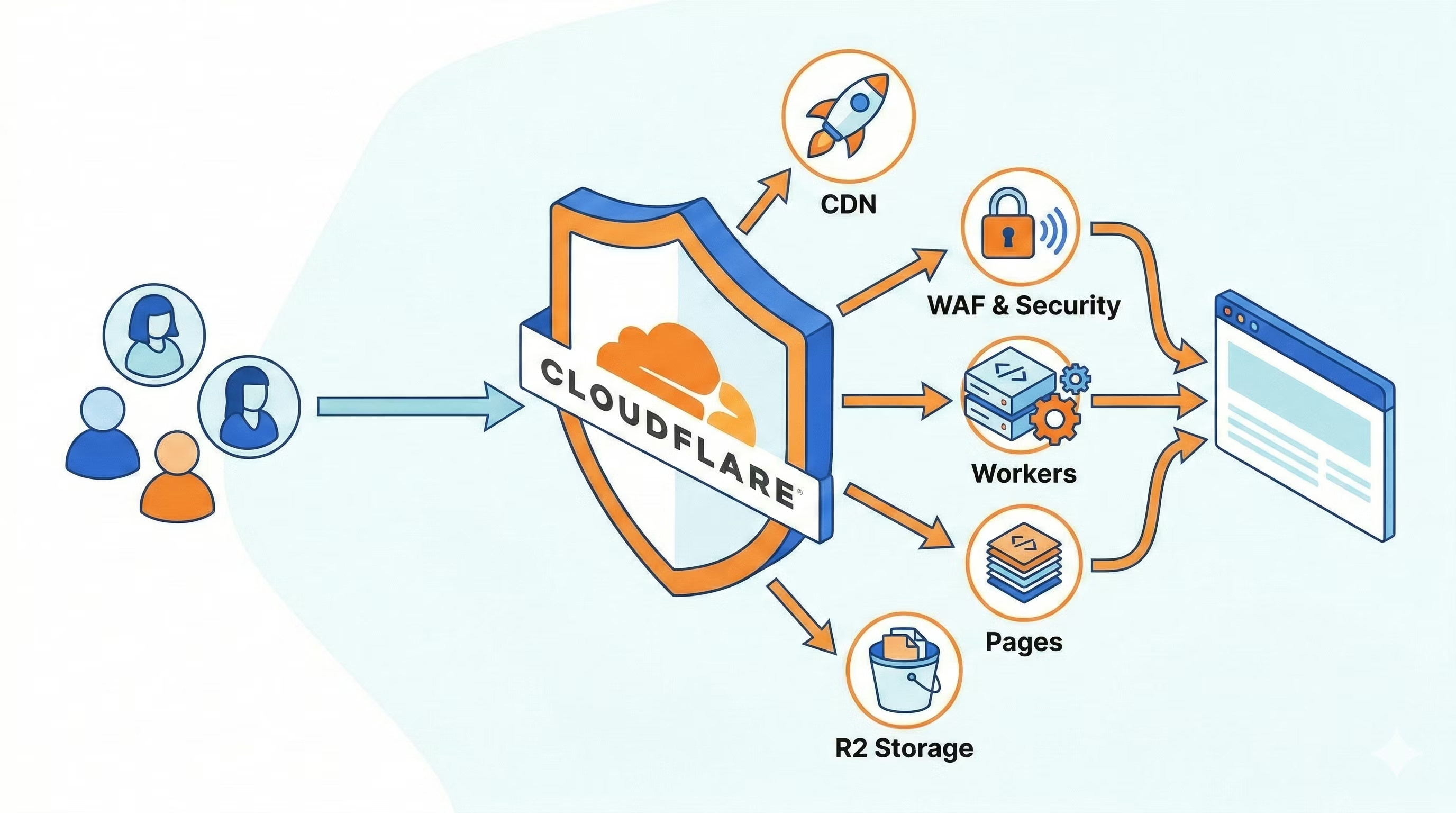
Cloudflare isn't just a mechanism to make websites appear faster. It encompasses DNS, WAF, authentication controls, serverless execution, static site delivery, file storage, logging infrastructure, and even AI-related features—quite a comprehensive set of capabilities.
From a web development agency perspective, this is actually quite significant.
The reason is that on projects, "displaying a site" alone isn't where things end. Questions like how to hide staging environments, where to send logs, and where to store images and attachments come up every time.
What makes Cloudflare convenient is that it makes it relatively easy to align all of these under a single coherent system. Of course, you don't need to consolidate everything with Cloudflare, and depending on the project, combining it with Supabase or AWS may be more natural.
That said, when you want to simplify your architecture or prefer a design that's easier to explain, Cloudflare is quite compelling.
Especially for corporate websites, recruitment sites, owned media, and sites with some member-only user flows, Cloudflare often feels like a natural fit. For frontend-focused companies, the benefit extends beyond just infrastructure—it's easy to handle as part of the implementation workflow.
How to understand Cloudflare most easily, first
You don't need to memorize all of Cloudflare's product names from the start. Rather, it's much easier to think of it as "a platform that comprehensively handles the entry point to the web."
For example, DNS is the first point browsers connect through, CDN delivers content quickly, WAF blocks suspicious access, Access protects specific pages, Workers runs lightweight processes, Pages handles static distribution, and R2 serves as file storage. Cloudflare comprehensively covers these web-adjacent elements across the board.
Call it a 'cross-cutting perspective,' if you will.
In projects, there are often many interconnected aspects—site delivery, operations, security, update workflows, restricted access, logging, AI integration, and more—but Cloudflare excels at organizing these clearly.
Where Cloudflare works in a production environment
.png?fm=avif)
Cloudflare is remarkably well-suited for web development agencies and frontend implementation firms.
You don't need heavyweight cloud architecture—it naturally gravitates toward a configuration that's just right for the scope.
For instance, building a corporate site with Astro, hosting it on Cloudflare Pages, securing certain restricted pages with Access, sending inquiries through Workers to email, and storing attachments in R2—that's a fairly natural setup.
You could assemble all of these with separate services, but depending on project scale, that approach can feel overengineered.
When you have too many services, complexity surfaces during handoff and maintenance. Consolidating with Cloudflare makes it easier to keep that complexity in check.
Is Cloudflare the answer for everything?
It's worth stepping back here.
Cloudflare is convenient, but consolidating everything there isn't always the right call.
For projects with heavy application logic, those centered on complex database design, or those where another cloud foundation is already firmly established, it often makes more sense not to make Cloudflare the centerpiece. Vercel can be a better fit for developer experience in some cases, and AWS still shines when you need to think through your entire backend architecture.
Choose it not because it does everything, but because of what you want to keep lightweight, robust, and organized. For site delivery, edge security, lightweight execution environments, restricted access, and storage, it offers compelling advantages.
The kinds of companies and projects it fits best
Cloudflare works well for projects like these.
- Projects with substantial content—such as corporate sites, recruitment sites, or owned media—where application complexity remains relatively low.
- Projects built primarily as static sites where you want to add just a few lightweight features like form submission or basic authentication.
- Projects where you want to consolidate operations across Cloudflare DNS, WAF, redirects, and related services.
For projects where the application is the main focus—such as full-scale SaaS or business systems—we look beyond Cloudflare alone and consider how to combine it with other platforms like Supabase.
Lately, LLMs make this kind of organization much easier.
Previously, you had to manually review service materials and documentation side by side and sort everything out in your head. But recently, that's changed quite a bit.
Bouncing ideas off Claude Code or Gemini—asking questions like "which Cloudflare features apply to this requirement" or "how should we approach staging protection and form infrastructure"—makes the initial organization incredibly fast.
Creating comparison table drafts and mapping key decision points has become much easier.
Responsibility boundaries, operational structure, audit requirements, and the update owner's level of understanding ultimately need human review—that's where things get risky if you skip it. I think the right division is: LLMs sketch the initial map, humans choose the path that fits the actual environment.
Summary
To sum up Cloudflare in a word: it's not just a performance service, but a platform that can support a remarkably broad range of web infrastructure. From a creative agency perspective, it works really well when you want to keep your setup lean but still maintain the necessary security measures and features.
Of course, Cloudflare isn't the only choice for everything.
The big appeal is being able to see the whole picture—site delivery, authentication controls, lightweight backend, storage, and even an entry point to AI utilization. Once you actually try it out, I think your impression will shift quite a bit! The setup is surprisingly straightforward!



A CEO who always acts as a true counterpart. Someone who loves understanding new technologies, finds joy in those moments when something becomes more convenient, and is a hands-on person who dives deep into projects. Excited about the technologies of tomorrow, enjoying new experiences at every stage of life.
Tadanori Morimoto
Project Manager / Director / Founded in 2007